Yelp QR Code Generator
Use IMQRScan’s Yelp QR code generator to paste your Yelp link, create a QR code, and place it wherever your customers actually are, table cards, receipts, menus, window stickers, and business cards. No design skills needed, and a free account is all you need to download.
- Works with any Yelp business profile or review link
- Create a free static QR code in under two minutes
- Dynamic QR options support editing and scan tracking
- Useful for table cards, receipts, menus, and window stickers
What is Yelp QR Code Generator?
You paste a Yelp business URL into IMQRScan QR code Generator, and it generates a scannable QR code. Anyone who scans it lands directly on your Yelp page, no searching, no typing, no wrong listings.
Convert a Yelp Link Into a QR Code
There's nothing exotic about a Yelp QR code, it's a standard URL QR code that stores a Yelp link. The technology isn't the interesting part. What matters is that most customers who intended to leave you a review, check your hours, or save your number never actually did it. Not because they didn't want to, because the steps got in the way.
Open Yelp, type in the business name, scroll past three businesses that look similar, find the right one, navigate to what you want. That's four or five friction points. A QR code cuts all of them. One scan. One tap. Done.
A Yelp QR code works like a URL QR code, but this page is optimized for Yelp business profile and review links.
What Is a Yelp QR Code?
A Yelp QR code stores your Yelp business page URL inside a scannable image. When someone points their phone camera at it, they go straight to your Yelp listing, iPhone or Android, no extra app needed.
It runs on the built-in camera app, iOS 11 and up, Android 9 and up. Your customers already have everything they need to scan it.
You can point the code at your main Yelp business profile or directly at the Yelp review submission page. Both are useful, and the right choice depends on what you want customers to do when they arrive. If you want them to browse your photos and contact details, use the profile link. If you want to make it easy for them to write a review, use the review page link, though that comes with some important policy context covered below.
Create Your Yelp QR Code Free
Go to IMQRScan's Yelp QR Code Generator, paste your Yelp business URL, and download in PNG or SVG. Free sign up for a basic code.
Want scan tracking, the ability to update the destination after printing, or management across multiple locations? Create a free account and generate a dynamic code. Same setup time, a lot more flexibility. Want one code that covers Google, Facebook, Yelp, and TripAdvisor reviews all at once? IMQRScan's Multi-Link QR Code sends customers to a small landing page where they pick the platform.
Create Yelp QR CodeNeed scan analytics or the ability to update the destination after printing? See pricing plans for team and business options.
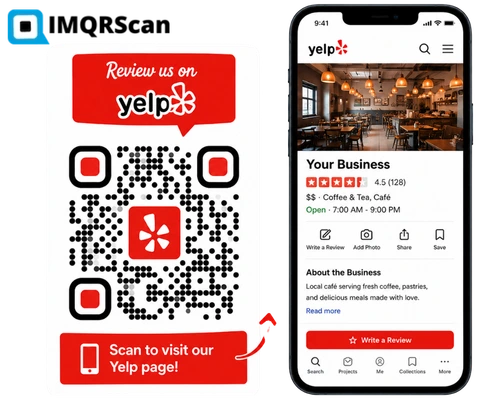
How to Create a QR Code for a Yelp Business Profile
Follow these simple steps to turn your Yelp business profile into a scannable QR code.
Copy Your Yelp Business Link
Open your Yelp business page and copy the URL from the address bar. It'll look something like:
yelp.com/biz/your-business-name-cityyelp.com/biz/your-business-name-city-2
Copy it straight from the address bar. Don't use a shared link or a Yelp short link, the full yelp.com/biz/ URL is the most stable and compatible format across devices and QR scanners.
Paste the Yelp Link Into IMQRScan
Go to IMQRScan QR Code Generator and paste the URL into the input field. A live preview of the QR code appears immediately and updates as you make changes in the next step.
Create a free account for a basic static and dynamic QR codes. If you want scan analytics or the ability to change the destination URL after printing, choose a dynamic code.
Customize Your Yelp QR Code
The default black-and-white code works fine as-is. If you want it to look more on-brand:
- Logo: upload your business icon or brand mark to sit in the centre of the code
- Colours: replace the black dots with your brand palette. Keep the foreground dark against a light background, reversing this tends to cause scanning issues
- Frame: add a border with a short label. "Find Us on Yelp" or "Scan to Visit Our Yelp Page" are both safe choices that won't conflict with Yelp's review solicitation guidelines
- Shape: change the dot and corner marker style if you want something less generic-looking
Download and Test the QR Code
Three download formats:
- PNG: for digital use: website, email signature, social media profile
- SVG: vector format that scales to any size without losing sharpness. Always use this for physical print materials
- PDF: print-ready, hand directly to your printer or designer
Test it before bulk printing. Open your phone camera, scan the downloaded code, and confirm it opens the right Yelp page. Check it on both iPhone and Android if you can. If you're printing on a glossy surface, run one test print first, glare affects scannability in ways that aren't obvious from a screen.
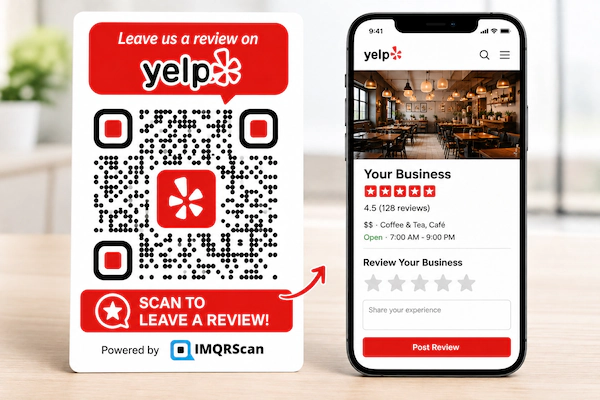
Create a QR Code for a Yelp Review Page
To send customers directly to the review form instead of your general profile, use the Yelp review URL format:
yelp.com/writeareview/biz/[your-business-id]
Find your business ID in the URL of your Yelp listing, it's the string of characters that appears after /biz/. Paste that review URL into IMQRScan the same way you'd paste a profile URL.
A passively displayed QR code is less aggressive than a direct review request. The code itself is not the issue. The messaging around it is what creates policy risk.
Yelp Profile QR Code vs Yelp Review QR Code
Both are valid uses. The difference is where customers land and what they see first.
| Profile Page QR Code | Review Page QR Code | |
|---|---|---|
| Links to | Full Yelp business listing | Direct review submission form |
| Customer sees first | Photos, hours, reviews, contact info | Review form, no profile context |
| Review quality | Typically longer, more detailed | Often shorter, less context before writing |
| Yelp policy risk | Lower, neutral path to listing | Higher if paired with a review-push CTA |
| Best for | Everyday placements, general visibility | High-intent moments: post-service, events |
For table cards, window stickers, and receipts, the profile link is usually the better call. The review page link makes sense at high-intent moments, right after a service or a purchase, but should always be paired with neutral wording. See Business Profile QR Code Generator for more on profile-style codes.
Where to Use Yelp QR Codes for Business
The timing of the placement matters as much as the location. Put the code in front of customers when the experience is freshest, right after the meal, the service, the job, the purchase. That window closes quickly.
Restaurants and Cafes
Table tent cards are one of the best placements for food businesses. Customers have just finished eating, their phone is nearby, and the experience is fresh. A small card with a Yelp QR code and "Find Us on Yelp" makes your profile easy to open without a manual search.
Salons and Spas
Place a Yelp QR code near the mirror, reception desk, or checkout counter. Clients are looking at the result of the service, so this is a natural time to help them find your Yelp page without making the interaction feel forced.
Clinics and Dental Offices
Waiting room cards, checkout desk displays, and appointment reminder printouts work well for clinics and dental offices. A QR code gives patients a simple path to your Yelp business page after a positive visit.
Hotels and Local Services
Hotels can place Yelp QR codes on key card sleeves, checkout folders, or reception desk signs. Local service providers can add them to job completion cards, invoices, or follow-up materials when the service is still fresh in the customer’s mind.
Retail Stores and Boutiques
Checkout counters, shopping bags, product tags, and printed receipts are useful spots for a Yelp QR code. A simple "Find Us on Yelp" card helps shoppers revisit your business page later without searching for your store name manually.
Receipts, Posters, Menus, and Business Cards
These are passive, always-on placements. Add a Yelp QR code to a receipt template, menu footer, poster, business card, or door sign. The path is always available, and customers can scan when they choose.
Running a restaurant specifically? See the Menu QR Code Generator to pair your Yelp code with a digital menu.
View Menu QR Code GeneratorStatic vs Dynamic Yelp QR Codes
Both types generate and scan the same way. The difference shows up after you've printed them.
| Feature | Static QR Code | Dynamic QR Code |
|---|---|---|
| Free to generate | Yes | Yes (free plan) |
| Edit destination URL after printing | No, reprint required | Yes, update from dashboard anytime |
| Scan analytics | None | Scans, location, device, timestamps |
| If Yelp URL changes | Code breaks, reprint needed | Update destination, printed code unchanged |
| Multiple location tracking | Separate static codes, no data | One dashboard, separate code per location |
| Best for | Single location, permanent setup | Campaigns, scale, multi-location |
One location, permanent placement, a URL that's not going to change, static is fine. Multiple locations, a large print run, or any scenario where the destination might need updating later, dynamic QR code saves you a reprint. The setup time is identical either way. Once you go dynamic, QR scan tracking also shows you which placements are actually driving visits.
Customize and Download Your Yelp QR Code
Everything in IMQRScan's customisation panel is optional. The default code works as a plain black-and-white QR code.
Best Practices for Yelp QR Codes
A Yelp QR code should be easy to scan, easy to understand, and safe to use on printed or digital materials.
Use the Right Print Size
Minimum 2 cm × 2 cm in print. Smaller than that and some cameras will struggle, especially in lower light. For anything scanned from more than arm's length, size it up.
Keep High Contrast
High contrast, always. Dark code on a white or very light background. Avoid patterned surfaces or coloured paper that competes visually with the code.
Add a Clear Label
Include a label. An unlabelled QR code with no context gets fewer scans than one with a short descriptor. "Find Us on Yelp" is enough.
Keep the Wording Neutral
Keep the wording neutral. Yelp's guidelines explicitly prohibit asking customers for reviews. "Scan to Visit Our Yelp Page" is compliant. "Leave Us a Review" is not.
Test on Two Devices
Test on two devices before bulk printing. iPhone and Android handle QR codes slightly differently. Scan on both before committing to a full print run.
Use SVG for Print
SVG for print, always. PNG files pixelate if scaled up beyond their original dimensions. SVG doesn't.
Use Dynamic Codes for Scale or Campaigns
Dynamic codes for scale or campaigns. Multiple locations or seasonal campaigns where something might change later, dynamic means a broken link is a two-minute dashboard fix, not a reprint.
Yelp Review QR Code Policy Note
For QR codes specifically, the issue isn't the code, it's the label and framing around it. A QR code on a table card that says "Find Us on Yelp" is a passive path to your listing. The customer chooses whether to engage. That's meaningfully different from a sign that says "Loved your visit? Scan here and leave us 5 stars."
Yelp's filter algorithm is also relevant here. Reviews that Yelp suspects were solicited, especially in bulk or with obvious review-pushing language nearby, are more likely to get filtered and not display publicly. Reviews from customers who arrived on your Yelp page because they chose to scan a neutral code tend to get filtered less. Beyond policy compliance, neutral wording produces better outcomes.
What Else Can a Yelp QR Code Do?
A Yelp QR code opens your Yelp business page or review form. IMQRScan adds tools that ask the right customers for reviews at the right time.
Free Print Templates
Download free table tents and receipt inserts with your Yelp QR code and a review us on Yelp message.
Country Rules
Send visitors from other countries to Google or Tripadvisor, while local customers land on Yelp.
Schedule and Scan Limits
Run a review campaign only for a set period, such as the weeks after a renovation or reopening.
More Tools for Every Yelp QR Code
Built-in QR Templates
Ready-made designs with colors, frames, and logo placement set.
Multiple QR Shapes
Dot, corner, and frame shapes that match your brand and still scan.
QR Stickers
Sticker-ready designs for labels, packaging, doors, and windows.
Retargeting Pixels
Meta, GA4, Google Ads, TikTok, and LinkedIn pixels on every scan.
PIN Protection
Ask for a PIN before the content opens.
Custom Domain
Use your own domain for the short link behind the code.
Team and Users
Invite teammates and give each one a role.
QR Code API
Create and manage codes from your own software.
Free on every plan
- Built-in QR templates
- Multiple QR shapes
- Free print templates
- QR stickers
Free plan includes
- Unlimited static QR codes
- 5 Smart (dynamic) QR codes
- 15 tracked scans
- 14 days of scan analytics
- Bulk creation, 5 per upload
- File uploads up to 5 MB
Professional plan and up
- PIN protection
- Schedule and scan limits
- Country rules
- Retargeting pixels
- QR Code API
- Team management and roles
- Custom domain add-on from Starter ($10/month)