Free QR Code Generator with Logo in the Middle
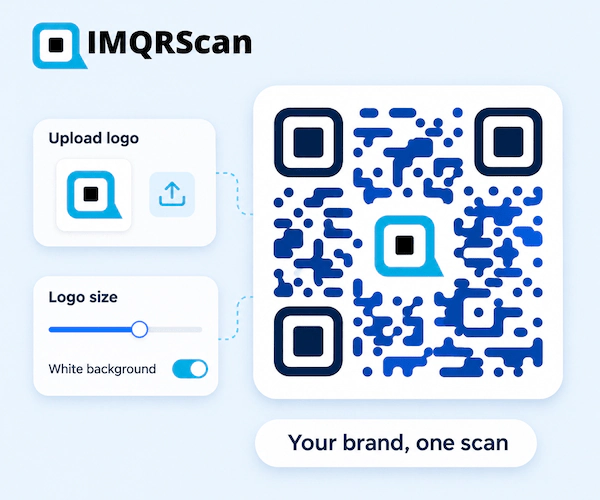
Use this free QR code generator with logo to place your brand mark in the center of any QR code. Upload a PNG, JPG, or WebP file, choose a size from 10 to 30 percent, and download PNG or SVG that still scans.
Free on every plan • Logo size you control • Level H error correction • PNG and SVG • Static and dynamic codes
What the Free QR Code Generator with Logo Does
A logo turns an anonymous black square into something people recognize before they scan. Here is exactly what the logo tool in IMQRScan does, so you know what to expect before you upload anything.
- File types: PNG, JPG, or WebP, under 250 KB
- Size control: 10 to 30 percent of the code width, 22 percent by default
- White backing: on or off, to separate the logo from the dots
- Scan safety: error correction switches to level H automatically
- Cost: free on every plan; a free account is needed to download
TL;DR: A logo works because QR codes repair missing parts. Keep it centered, keep it moderate, and test it.
- Use: a simple, square logo
- Avoid: logos with small text or pale colors
- Test: the printed size on two phones
What Is a QR Code with a Logo?
A QR code with a logo is a normal, scannable QR code with a brand mark placed in its center. A QR code generator with logo is the tool that builds it: it makes room for the logo, raises the error correction, and gives you a file to print or share.
People also call it a logo QR code, a branded QR code, or a QR code with a logo in the middle. They all mean the same thing: your logo sits in the center, and the code around it still opens your link, menu, contact card, or page.
The logo does not change what the code does. It changes how the code looks and how quickly people trust it. A small café logo on a table card tells guests the code belongs to the café, not to a stranger who stuck a sticker on the table.
Why a QR Code with a Logo Still Scans
QR codes store extra repair data. When part of the pattern is hidden, the phone rebuilds it.
Every QR code carries error correction, a set of backup codewords based on Reed-Solomon math. The QR code standard, ISO/IEC 18004, defines four levels. Denso Wave, the company that invented the QR code in 1994, describes how much of the code each level can restore.
A logo covers part of the pattern, so it uses some of that repair capacity. That is why a good QR code generator with logo switches to the highest level, H, as soon as you add one. IMQRScan does this for you.
One honest note: Denso Wave does not recommend covering a QR code at all, because a covered code has less spare capacity left for dirt, scratches, or glare. That is the real reason to keep a logo small and to test before printing.
Read Denso Wave's explanation of error correction for the technical detail.
| Level | Restores about | Good for |
|---|---|---|
| L | 7% of the data | Clean screens, plain codes |
| M | 15% of the data | Everyday printed codes |
| Q | 25% of the data | Codes that may get dirty or worn |
| H | 30% of the data | Every QR code with logo |
How IMQRScan Places Your Logo
The most common way a logo breaks a QR code is pasting it on top of a finished code in a design app. The logo then hides random parts of the pattern, and nothing raises the error correction to make up for it. Designers on the Adobe and Microsoft forums describe codes that scan on one phone and fail on another phone of the same model.
The QR code generator with logo on this page works differently:
- It clears a clean square in the center for your logo, instead of covering random dots.
- It never covers the three corner squares, the finder patterns phones use to locate the code.
- It switches to level H the moment you add a logo.
- It caps the logo at 30 percent of the width, which covers only about 9 percent of the code area, well inside the 30 percent that level H can restore.
How to Make a QR Code with a Logo
Use the generator at the top of this page. The steps match its buttons and take about three minutes.
Choose what the code opens
In the generator above, pick the QR code type, such as a website, menu, contact card, WiFi, review page, or social profile.
Add your content
Enter the link or details and check them before you start on the design.
Upload your logo
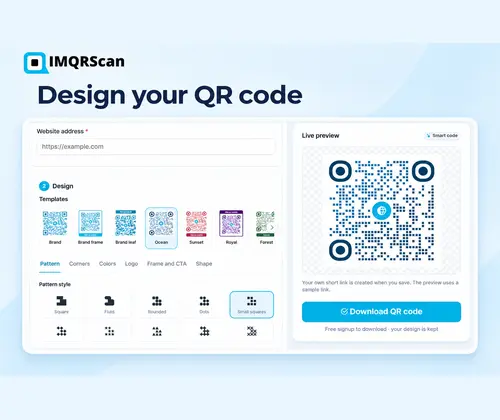
Open Design, then Logo, and upload a PNG, JPG, or WebP file under 250 KB. A square logo looks best.
Set the logo size and backing
Move the size slider between 10 and 30 percent of the code width, and turn the white backing on if your logo has thin lines.
Check colors and contrast
Keep the dots clearly darker than the background. Add a frame with a short call to action if you like.
Download and test
Download PNG for screens or SVG for print, then scan the final file on at least two phones before you print.
How Big Should the Logo Be in a QR Code?
The slider sets the logo width as a share of the code width. The area it covers is much smaller, because area grows with the square of the width.
| Slider setting (share of width) | Share of the code area | Best for |
|---|---|---|
| 10% | About 1% | Very detailed logos, tiny prints, codes that hold a lot of data |
| 15% | About 2% | Business cards, small labels, long links |
| 22% (default) | About 5% | Most uses: menus, flyers, packaging, signs |
| 30% (maximum) | About 9% | Simple icons on large prints, posters, and screens |
Why advice online differs
Some guides say a logo can cover 30 percent, others say 40. The 30 percent figure is the repair limit of level H, not a safe target. Using all of it leaves nothing for dirt or glare.
Long links need a smaller logo
A long link makes a denser code with smaller dots. If your logo looks crowded, shorten the link or use a dynamic code, which keeps the pattern simple.
How to Prepare Your Logo for a QR Code
The right file makes the biggest difference. Five minutes of preparation saves a reprint.
Use a square version
The logo space is square. A wide wordmark shrinks to a thin strip. Use your icon, monogram, or square social profile mark instead.
Skip the small text
Taglines and fine lettering turn into gray smudges at QR size. Keep only the shape people recognize.
Prefer a transparent PNG
A PNG with a transparent background sits cleanly on the white backing or the code background.
Export SVG logos to PNG
The uploader accepts PNG, JPG, and WebP. If you only have an SVG or PDF logo, export a square PNG of about 500 by 500 pixels.
Keep it under 250 KB
A 500 pixel square PNG is usually well under the limit. Compress larger files before uploading.
Check the contrast
A dark logo on dark dots disappears. Turn on the white backing or use a lighter version of the logo.
Three Ways to Get a QR Code with a Logo
People on Reddit, Quora, and the Adobe and Microsoft forums try all three. Here is how they compare.
| What matters | QR code generator with logo | Logo pasted on in a design app | Built-in browser or app QR |
|---|---|---|---|
| Logo in the center | Yes | Yes, placed by hand | Usually no |
| Space cleared for the logo | Yes | No, it covers dots | Not applicable |
| Error correction set to H | Automatic | Only if you chose it first | Not shown |
| Logo size control | 10 to 30 percent slider | Any size, no limit | None |
| Scan risk | Low, still test | High | Low, but no branding |
| Change the link later | Yes, with a dynamic code | No | No |
| Best for | Anything people see | Experienced designers who test widely | Quick personal sharing |
What to Check in Any Free QR Code Generator with Logo
The most common complaint in forum threads is a free logo tool that turns out not to be free: the logo is locked, the download needs a payment, or the code stops working after a trial. Ask these questions of any tool, including this one.
| Question to ask | Answer for IMQRScan |
|---|---|
| Is the logo option free? | Yes, on every plan, including Free. |
| Do I need an account? | Yes, a free account to download. No credit card. |
| Will the code expire? | Static codes never expire. Dynamic codes work while your plan is active. |
| Can I control the logo size? | Yes, from 10 to 30 percent of the code width. |
| Which logo files work? | PNG, JPG, and WebP, under 250 KB. |
| Which download formats? | PNG for screens and SVG for print. |
Real Example: A Bakery Adds Its Logo to Table Cards
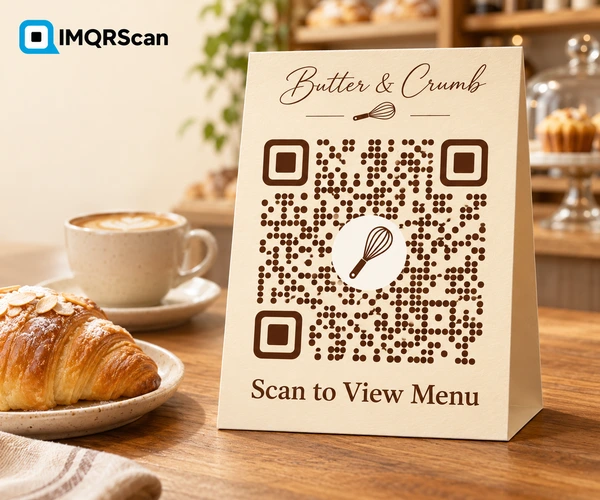
A small bakery wants a menu QR code on its table cards. Its logo is a round wordmark with the bakery name in thin script, plus a whisk icon.
- The owner exports only the whisk icon as a 500 pixel square PNG with a transparent background, about 40 KB.
- She creates a dynamic menu code, so prices can change without new cards.
- She uploads the icon and keeps the default size of 22 percent, with the white backing on.
- She chooses dark brown dots on a cream background, with the frame text Scan to View Menu.
- She prints a test card at 3 cm wide and scans it on an older Android phone and a new iPhone under the café lights.
- Both scan on the first try, so she downloads SVG for the print shop.
Printing a QR Code with Logo: Size and Testing
A design that scans on your monitor can still fail on paper. Run through this list before any print order.
- Print at least 2 cm wide for cards and labels scanned up close.
- Go bigger for distance: a rough rule is 1 cm of code for every 10 cm of scanning distance.
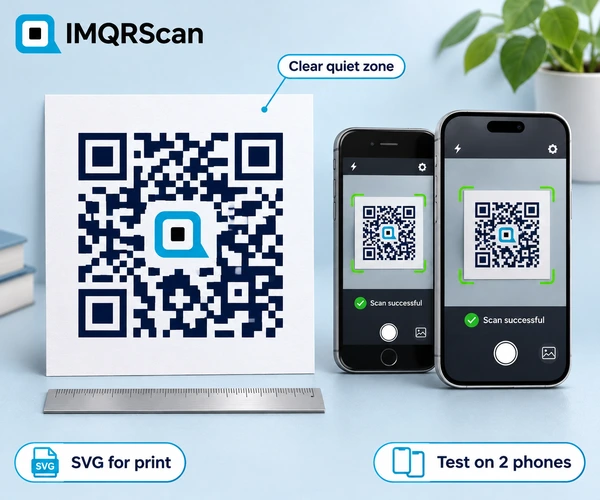
- Keep the quiet zone clear, the empty margin around the code.
- Use SVG for print so the logo and dots stay sharp at any size.
- Test on two or more phones, including an older one, in the real lighting.
- Avoid shiny finishes on small codes, because glare hides dots.
Why Is My QR Code with Logo Not Scanning?
Change one thing at a time, then test again.
| What you see | Likely cause | Fix |
|---|---|---|
| Some phones scan, others do not | Logo too large, or a low-end camera | Lower the logo size by a few points and test again |
| Nothing scans at all | Weak contrast or inverted colors | Use dark dots on a light background |
| Scans on screen, fails in print | Printed too small or blurry | Print larger and use the SVG file |
| Logo blends into the pattern | Dark logo on dark dots | Turn on the white backing |
| Scans slowly from an angle | Glossy finish or curved surface | Use a matte finish and a flat area |
| Code looks very crowded | A long link plus a logo | Shorten the link or use a dynamic code |
Where a QR Code with Logo Helps Most
A logo matters most where strangers see the code and need a reason to trust it.
Business Cards
Your logo next to a contact card code makes the card feel finished.
Menus and Table Cards
Guests can tell the code belongs to the restaurant.
Product Packaging
A brand mark links the code to the product, not a random site.
Review Requests
A logo on receipts and counters makes review codes more trusted.
Events and Tickets
An event logo on badges and posters keeps the look consistent.
Guest WiFi
A hotel or café logo on a WiFi card looks official.
Real Estate Signs
An agency logo on signs and brochures builds recognition.
Invoices and Letters
A small branded code fits neatly into a letterhead.
Want to go further than a logo? Set colors, dot styles, corner eyes, and frames on the QR code generator with customization, or pick an outline on the QR code shape generator.
Static vs Dynamic QR Code with Logo
The logo works the same on both. The difference is what you can do after printing.
| Feature | Static QR code with logo | Dynamic QR code with logo |
|---|---|---|
| Logo and full design | Yes | Yes |
| Change the destination later | No | Yes |
| Scan analytics | No | Yes |
| Pattern density | Denser with long content | Simple, short link |
| Cost on IMQRScan | Free and unlimited | 5 free, then from $2.99 a month |
Choose a static QR code for content that never changes, the dynamic QR code generator for menus and campaigns, and QR code tracking to see scans. Making many codes with one logo? Use the bulk QR code generator.
Download Your QR Code with Logo as PNG or SVG
Pick the format by where the code will appear.
What Else Can You Do With a QR Code with Logo?
Your logo is the start. IMQRScan adds free tools that keep every branded code consistent, in print, on stickers, and across your team.
Built-in QR Templates
Save your logo design once and start every new code from it, so all your codes share one look.
Multiple QR Shapes
Combine your logo with a circle, heart, or one of dozens of other QR shapes.
QR Stickers
Turn your logo code into a print-ready sticker for packaging, doors, and windows.
More Tools in IMQRScan
Free Print Templates
Flyers, posters, and table tents with your code already placed.
Multi-Language Pages
Show hosted landing pages in the languages your visitors read.
Schedule and Scan Limits
Set start and end dates, or cap the number of scans.
Country Rules
Send each country to a different destination from one code.
Retargeting Pixels
Meta, GA4, Google Ads, TikTok, and LinkedIn pixels on every scan.
PIN Protection
Ask for a PIN before the content opens.
Custom Domain
Use your own domain for the short link behind the code.
Team and Users
Invite teammates and give each one a role.
QR Code API
Create and manage codes from your own software.
Free on every plan
- Logo upload and all design options
- Built-in QR templates
- Multiple QR shapes
- Free print templates
- QR stickers
- Multi-language landing pages
Free plan includes
- Unlimited static QR codes
- 5 Smart (dynamic) QR codes
- 15 tracked scans
- 14 days of scan analytics
- Bulk creation, 5 per upload
- File uploads up to 5 MB
Professional plan and up
- PIN protection
- Schedule and scan limits
- Country rules
- Retargeting pixels
- QR Code API
- Team management and roles
- Custom domain add-on ($10/month)
QR Code Generator with Logo FAQs
Answers about logo QR codes, sizes, files, and scanning.
Social Media and App QR Codes with the Platform Logo
Sometimes the right logo is not yours. A QR code that opens Instagram works better with the Instagram mark, because people know what will happen before they scan.
When you pick a social, messaging, payment, or review type in the generator, you get ready-made templates in the platform's colors with its logo already in place. There are templates for about 50 platforms, including:
Every other type, such as a menu, contact card, or WiFi code, gets templates with a matching icon. You can always replace the template logo with your own.