Free Transparent QR Code Generator
A transparent QR code has no white box behind it, so it sits cleanly on your design. With IMQRScan you create the code, turn off the background, pick a code color that stands out, and download a free PNG or SVG. It scans like any other QR code when the contrast is strong and there is a clear margin around it.
- Free PNG and SVG downloads with a transparent background
- No watermark, no limit on static codes
- Custom colors and logo upload
- Needs a free account, no credit card

Quick Answer: How Do You Make a QR Code Transparent?
To make a QR code transparent, create your QR code, open the design settings, turn off the white background, and download the code as a PNG or SVG file. Keep strong contrast between the code and the surface behind it, and leave a clear margin around it, so it stays scannable.
TL;DR
- A transparent QR code has no white box behind it.
- It scans like a normal code when contrast is strong and the margin is clear.
- Download PNG for screens and SVG for print. JPG cannot be transparent.
- Put it on a plain area, never on a busy photo.
What Is a Transparent QR Code?
Definition: A transparent QR code is a QR code image where only the dark squares are drawn. Every other pixel, including the space between the squares, is see-through. Whatever sits behind the file, such as a color, a label or a window, shows through.
A normal QR code comes as a square image with a white background. That white box helps the code scan, but it often looks like a sticker slapped on top of a design. A transparent code drops the box and lets your own background do that job instead.
This changes one important thing. With a white box, the file brings its own contrast and its own clear margin. With a transparent file, your design must provide both. That is why most transparent QR codes that fail do so because of where they are placed, not because of the file itself.
The data inside the code does not change. A transparent QR code holds the same link or content, follows the same QR code standard (ISO/IEC 18004), and opens in the same phone camera apps as any other code.
How to Make a Transparent QR Code in 4 Steps
It takes about two minutes. The steps are the same on a laptop, tablet or phone.
Choose your QR code type
Open the IMQRScan QR code generator and pick what the code should do, such as open a website, share a menu or save a contact.
Add your content
Paste your link or fill in the details. Check spelling, because a static QR code cannot be changed after you download it.
Remove the background
In the design settings, turn off the background so it becomes transparent. Pick a dark code color if the code will sit on a light surface, or a light color for a dark surface.
Download and test
Download a PNG for screens or an SVG for print. Place it on your real design and scan it with two or three phones before you publish or print.
Transparent QR Code vs White Background QR Code
Neither one is always better. Pick the one that fits the surface the code will sit on.
| Question | Transparent background | White background |
|---|---|---|
| How it looks | Blends into your design | Shows as a white square |
| Who provides contrast | Your design | The file itself |
| Who provides the clear margin | Your design | The file itself |
| Works on plain color areas | Yes, if the code color stands out | Yes |
| Works on busy photos | Often fails | Yes, the box protects it |
| Best file types | PNG, SVG | PNG, SVG, JPG |
| Best for | Packaging, branded print, websites, glass and color panels | Busy backgrounds, stickers, anything you cannot test first |
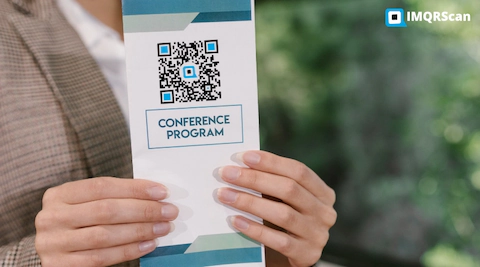
Simple rule
If the code will sit on a flat, even color, use a transparent background. If it must sit on a photo, a pattern or a surface you cannot test, keep the white background. A code that scans is always better than a code that looks nice and fails.
Remove the White Background From a QR Code
The white square is just part of the image, not part of the data. When you turn the background off, the squares that carry the data stay exactly the same. Only the empty pixels become see-through.
That is why a transparent QR code opens the same link as the white version. You can swap one for the other in a design without changing what people see after they scan.
Before
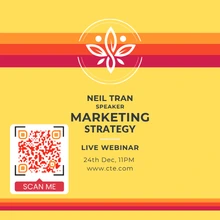
White square background
After
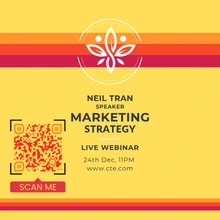
No background, color shows through
6 Rules That Keep a Transparent QR Code Scannable
Follow these and your code will scan on the first try.
1. Keep strong contrast
Phones read the difference between dark and light. Black on white is the safest. Dark blue on pale yellow works. Red on orange or grey on grey does not.
2. Give it a quiet zone
The QR code standard asks for an empty margin around the code. Leave a plain area about four squares wide on every side. No text, lines or edges inside it.
3. Place it on a flat area
Put the code on one even color. Gradients are fine if they are gentle. Photos with detail, text or patterns behind the code usually break it.
4. Print it big enough
For a business card or label, 2 x 2 cm is the practical minimum. Signs read from a distance need much more. See our minimum QR code size guide.
5. Keep logos small and central
When you add a logo, IMQRScan uses error correction level H so the code can still be read with part of it covered. A small logo in the center is safe. A large one is not.
6. Test on real phones
Scan the final design, not the file alone, with two or three phones. Test light codes on dark backgrounds with extra care, as some older scanner apps cannot read them.
When You Should Not Use a Transparent QR Code
A transparent background is a design choice, not an upgrade. In these cases, keep the white background:
- On busy photos or patterns. The detail behind the code mixes with its squares.
- On shiny or clear surfaces you cannot control. Glass and glossy film reflect light. What shows through changes with the room behind them.
- On stickers placed in unknown spots. You do not know what surface they will end up on.
- When you cannot test before printing. A white box is the safe default when there is no time to check.
A good middle option is a small solid shape behind the code in one of your brand colors. It looks designed, and it gives the code the contrast and margin it needs.
PNG vs SVG for a Transparent QR Code
Only some file types can hold a transparent background. Here is how to choose.
| Format | Transparent? | Best for | Watch out for |
|---|---|---|---|
| PNG | Yes | Websites, social media, email, slides, Canva | Can look blurry if you stretch a small file |
| SVG | Yes | Print, packaging, business cards, signs, Figma and Illustrator | Some basic apps, like older Word versions, do not open SVG |
| JPG | No | Photos only | Always adds a solid background, so never use it for transparency |
A good rule: PNG for screens, SVG for print. If a print shop asks for a vector file, send the SVG. Learn more in our QR code formats guide, or go straight to the QR code PNG generator or the QR code SVG generator.
White QR codes on dark backgrounds
You can make a white code with a transparent background for dark packaging, dark websites or night-themed posters. Choose white as the code color and turn off the background. The same rules apply: plain dark surface, clear margin, and test with several phones.
How to Use a Transparent QR Code in Canva, Figma or Word
- Download your QR code from IMQRScan as a PNG (or SVG for Figma and print work).
- Upload the file to your design tool. In Canva, use Uploads. In Figma, drag the file onto the canvas. In Word, use Insert, then Pictures.
- Place it on a flat part of your design and resize it by dragging a corner, so it keeps its square shape.
- Leave a clear margin around it, then export your design.
- Scan the exported design with your phone before sharing or printing.
Where to Use a Transparent QR Code
These are the places where removing the white box makes the biggest difference.
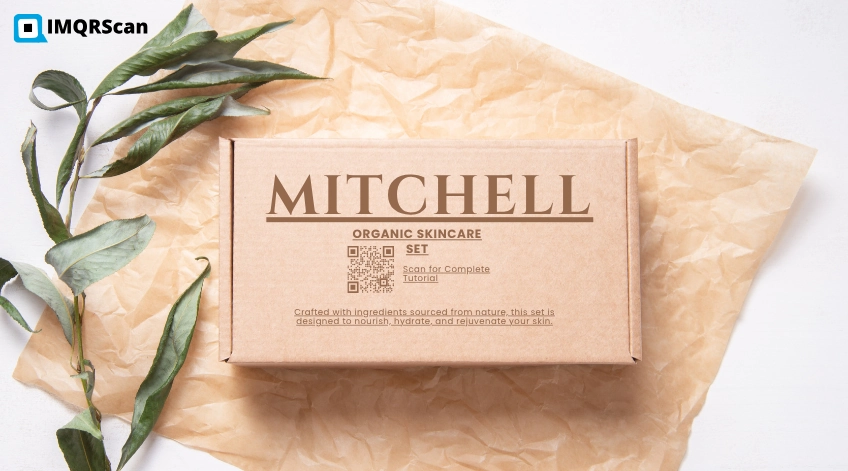
Product packaging
Place product QR codes on colored boxes and labels for manuals, recipes or reorders.
Business cards
Match the code to your card color so it feels part of the design. Keep it at least 2 x 2 cm.
Restaurant menus
Add a menu QR code to table cards and menu covers without a white patch.
Windows and glass
Print on clear vinyl for shop windows, then check it against the view behind the glass.
Websites and banners
Place a URL QR code on a colored hero section or dark mode page.
Posters and event signs
Use SVG for large prints so the code stays sharp, and size it for the scanning distance.
Common Mistakes With Transparent QR Codes
| Mistake | What happens | Fix |
|---|---|---|
| Saving as JPG | A white or black box comes back | Download PNG or SVG |
| Low contrast colors | Phones cannot find the pattern | Dark code on light surface, or the reverse |
| Text or lines too close | The code blends into the design | Keep a clear margin on every side |
| Stretching the image | Squares turn into rectangles and scanning fails | Resize from a corner only |
| Placing it on a busy photo | Background detail looks like extra squares | Move it to a plain area or keep a solid shape behind it |
| Skipping the test | You find the problem after printing | Scan the final design with several phones |
Best Tools to Generate White or Transparent QR Codes
The right tool depends on whether you need a real transparent download, SVG for print, dynamic editing, or no signup. Here is how some popular tools compare.
| Tool | Transparent background | Download formats | Dynamic QR codes | Signup for free codes |
|---|---|---|---|---|
| IMQRScan | Yes, in the design settings | PNG, SVG | Yes, 7-day free trial then paid | Free account needed |
| QR Penguin | Yes | PNG, SVG | Scan tracking after signup | Not needed |
| QRCode Monkey | Not in the web editor; their advice is to remove the background in vector software | PNG, SVG, PDF, EPS | No, offered by their paid sister product | Not needed |
| Adobe Express | Not stated on its QR page | PNG, JPEG, PDF | No, static only | Not stated on its QR page |
Checked in September 2026 from each tool's public pages and official posts. Tools change often. If something here is out of date, tell us and we will fix it, as explained in our Editorial Policy.
Best for print designers
Pick a tool with a transparent SVG download, so the code stays sharp on packaging, cards and signs. IMQRScan and QR Penguin both offer this.
Best for marketing
If the code goes on printed material, use a dynamic QR code so you can change the link later and see scan counts. IMQRScan supports transparent dynamic codes.
Best for a quick one-off
If you need one static code right now and do not want an account, a no-signup tool like QR Penguin is the fastest option.
What to look for in any transparent QR code generator
- A real transparent PNG, not a PNG with a white fill.
- SVG for print, so the code stays sharp at any size.
- No watermark on free downloads.
- Any code color, including white for dark designs.
- Higher error correction when you add a logo.
- Dynamic codes if you may need to change the link after printing.
IMQRScan does all six. Comparing more tools? Read our guide to the best QR code generator.
Static or Dynamic Transparent QR Code?
Transparency is only about how the code looks. You still need to choose how it works.
Static
Free and unlimited. The link is stored inside the code, so it cannot be changed after printing and there is no scan tracking. Good for links that will never change.
Dynamic
You can change the link any time and see scan counts. It stops working if the plan ends or the scan limit is reached. Good for packaging and campaigns. See the dynamic QR code generator.
Transparent QR Code FAQ
Make Your Transparent QR Code
Create a QR code with no white background, pick your colors, add your logo, and download a free PNG or SVG. It takes about two minutes.
Create a Free Transparent QR Code