QR Codes on Product Packaging: Size, Placement, and Ideas
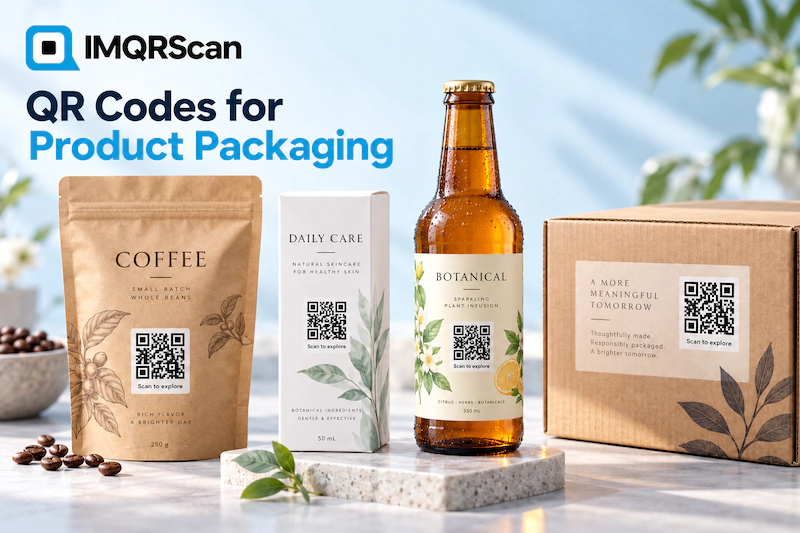
A QR code on product packaging turns a box, bottle, or label into a link to everything that does not fit on the pack: ingredients, instructions, videos, reviews, and your other products.
Quick Answer
To add a QR code to product packaging, choose one useful destination, create a dynamic code so you can change it later, download it as SVG, and print it at 2 x 2 cm or larger on a flat, matte area with a short line such as "Scan for how to use". Test the printed proof before the full run.
What This Guide Covers
- How Do QR Codes on Product Packaging Work?
- Benefits of QR Codes on Product Packaging
- What Should a Packaging QR Code Open?
- How to Add a QR Code to Product Packaging
- Static or Dynamic QR Codes for Packaging?
- What Size Should a Packaging QR Code Be?
- How to Print QR Codes on Labels Without Errors
- Packaging QR Code Ideas by Industry
- Using Packaging QR Codes for Marketing
- Can a Packaging QR Code Prove Authenticity?
- Common Packaging QR Code Mistakes
- Packaging QR Code Features in IMQRScan
- Frequently Asked Questions
How Do QR Codes on Product Packaging Work?
Definition
Packaging QR code: a QR code printed on a box, bottle, bag, or label that opens a digital page about the product when a customer scans it. The QR code format is defined by the ISO/IEC 18004 standard, so every modern phone camera can read it.
The code on the pack holds a short link. A customer points the camera of an iPhone or Android phone at it, taps the prompt, and the page opens in the browser. No app is needed.
Packaging is small, but customers want a lot of information: how to use the product, what is inside it, where it comes from, and what other people think of it. A QR code on product packaging moves all of that onto the phone, and keeps the pack clean.
Benefits of QR Codes on Product Packaging
A packaging QR code keeps working for as long as the product sits in someone’s kitchen, bathroom, or toolbox.
- More information, less print. Instructions, ingredients, and safety notes move to the phone.
- Updates without reprinting. With a dynamic code, the page changes while the printed boxes stay the same.
- A direct line to buyers. Retail shelves hide who buys your product. A scan connects you to them.
- Repeat sales. The code can open your full range, so buyers reorder or discover more.
- Measurable. Scan numbers show which products and markets engage most.
What Should a Packaging QR Code Open?
Pick the one thing that helps the customer most after they buy. A packaging code that opens your homepage is a wasted scan.
| Destination | Best for | Code type |
|---|---|---|
| How-to video | Cosmetics, tools, electronics | YouTube QR code |
| Manual or instructions file | Appliances, furniture, toys | File upload QR code |
| Your full product range | Shops and small brands | Product QR code catalogue |
| Reviews | Any product with happy buyers | Google Review QR code |
| Support chat | Products that need help to set up | WhatsApp QR code |
| Product page or shop | Online brands | URL QR code |
Want customers to browse all your products with photos and prices from the pack? Build a catalogue with the product QR code generator.
How to Add a QR Code to Product Packaging in 5 Steps
Step 1: Choose What the Code Opens
Pick one destination that helps after purchase, such as product details, a how-to video, reviews, or your product catalogue.
Step 2: Create a Dynamic QR Code
Create the code in IMQRScan as a Smart code, so you can change the destination later without reprinting the packaging.
Step 3: Design and Download SVG
Add your brand colors and a small logo, keep strong contrast, and download the code as SVG for print.
Step 4: Place It on the Artwork
Place the code on a flat, matte area of the packaging at 2 x 2 cm or larger, with a clear border and a short call to action.
Step 5: Test the Printed Proof
Scan the printed proof with an iPhone and an Android phone before you approve the full print run.
Static or Dynamic QR Codes for Product Packaging?
Dynamic codes suit most packaging, because boxes stay on shelves for months while links change. A dynamic code, called a Smart code in IMQRScan, can point to a new page at any time.
| Feature | Static QR code | Dynamic QR code |
|---|---|---|
| Change the page after printing | No, reprint needed | Yes, anytime |
| Scan tracking | No | Yes, by date, city, and device |
| Cost on IMQRScan | Free, unlimited scans, no expiry | From $2.99 a month, billed annually |
| Best for | A permanent link that never changes | Packaging, labels, and product ranges |
If you change suppliers, move your shop, or update a recall notice, a dynamic packaging code keeps every printed box pointing to the right page. Read the full static versus dynamic QR code comparison.
What Size Should a QR Code Be on Product Packaging?
Print a packaging QR code at least 2 x 2 cm, and larger on boxes and bags. Below 2 cm, older phones and poor light cause failed scans.
| Packaging | Suggested size |
|---|---|
| Small label, jar, or sachet | 2 x 2 cm |
| Bottle or tube | 2 to 2.5 cm, on the flattest side |
| Box or bag | 3 to 4 cm |
| Shipping carton or display | 5 cm or larger |
Keep a clear white border, the quiet zone, of about four modules around the code. For more detail, read the minimum QR code size guide.
How to Print QR Codes on Product Labels Without Scanning Errors
Most packaging QR codes fail because of the surface, not the code. Check these before you print.
- Use SVG for print. It stays sharp on any printer. Use PNG only for screens and online listings.
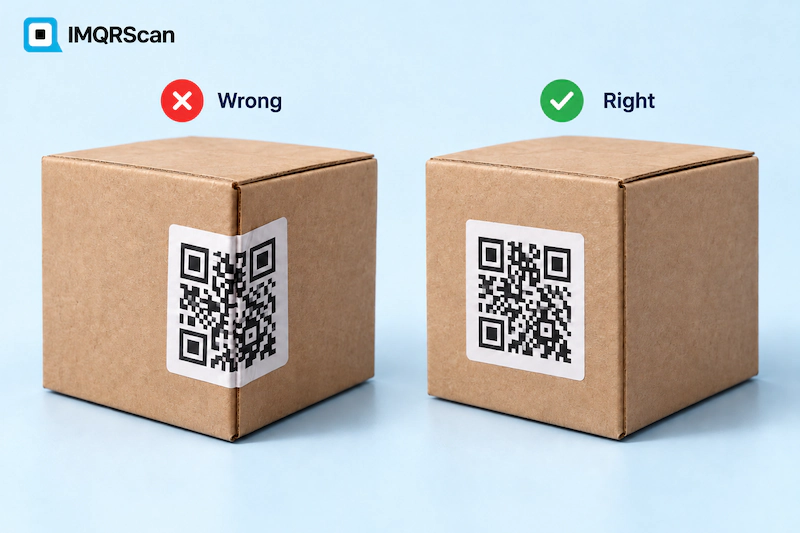
- Choose a matte area. Gloss and foil reflect light and hide the pattern.
- Avoid tight curves. On a bottle or can, keep the code small enough to stay flat on the side.
- Keep dark on light. A dark code on a white or light background scans best.
- Stay away from folds and seams. A box fold through the code breaks it.
Adding codes to packaging you already printed? A sticker works well. See our guide to QR code stickers.
Packaging QR Code Ideas by Industry
Food and Drink
Link food packaging to ingredients, allergens, nutrition facts, recipes, and where the food comes from. Shoppers with allergies read the full details before they buy.
Cosmetics and Personal Care
Link cosmetics packaging to ingredient lists, how-to videos, shade guides, and reviews. A short video often explains a product better than any printed text.
Electronics and Appliances
Link to the manual, setup videos, warranty registration, and support chat. Customers find help without searching for a model number.
Fashion and Retail
Link to care instructions, size guides, styling ideas, and the rest of the collection in a product catalogue.
Key Takeaway
The best packaging QR codes answer the question a customer has right after opening the pack: how do I use this, what is in it, and where do I get more?
Using Packaging QR Codes for Marketing
A packaging QR code is one of the few marketing channels that reaches every buyer, even those who bought in someone else’s store.
- Collect reviews: link a few weeks of use to a review page, with a line such as Loved it? Leave a review.
- Drive reorders: open your product catalogue, so buyers order again on WhatsApp or in your shop.
- Run loyalty offers: point the code to a members page or a discount for the next purchase.
- Grow followers: open your social profiles, or one page with all of them.
How to Track Scans From Product Packaging
Use a dynamic code, and your dashboard shows packaging scans by date, city, country, and device. Use one code per product or per market, so you can compare them.
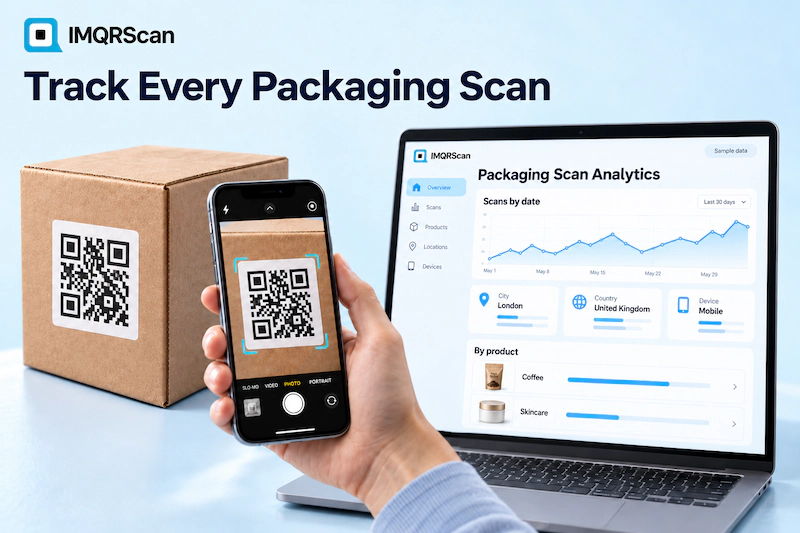
The numbers often show when customers scan: right after purchase for setup help, or weeks later for reorders. Build the destination for that moment. Learn more about QR code tracking.
Can a Packaging QR Code Prove a Product Is Original?
Not on its own. If every box carries the same code, a counterfeiter can copy it, and the copy opens the same page.
Real authenticity checks need a unique, serialized code on every single item, linked to a verification system that records each scan and flags duplicates. That is a specialist anti-counterfeit service. A standard packaging QR code is excellent for information and marketing, but it should not be sold to customers as proof that a product is genuine.
Common Packaging QR Code Mistakes to Avoid
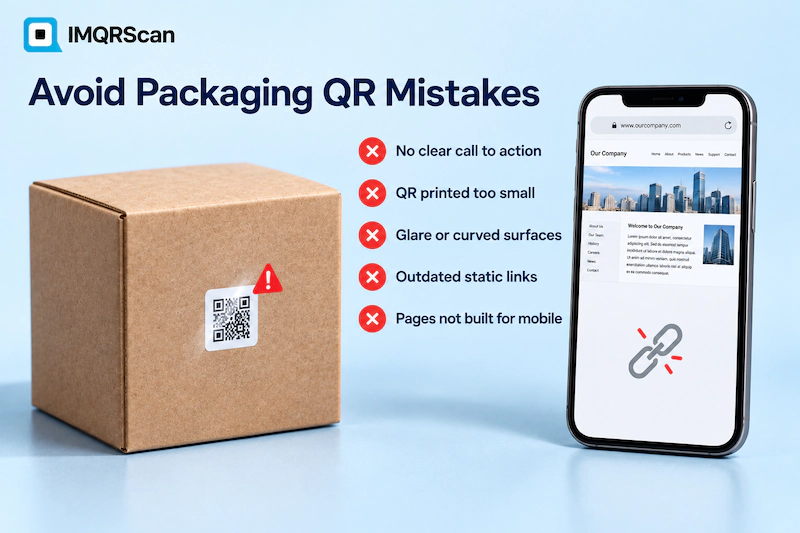
- No call to action. People do not scan a code when they do not know what it opens.
- Printing below 2 cm. Small codes fail on older phones.
- Glossy or curved placement. Glare and curves break scans.
- Static codes on long-lived packaging. A changed link means reprinting every box.
- A desktop-only page. Every scan arrives on a phone, so the page must work on mobile.
What Else Can a Packaging QR Code Do in IMQRScan?
A packaging QR code keeps selling long after the product leaves the shelf. IMQRScan adds tools that send each market to the right page, protect private content, and print codes onto any pack.
Country Rules
Send buyers in each country to a page in their language and currency from one printed packaging code.
QR Stickers
Print QR sticker labels to add codes to packaging you already have in stock.
QR Code API
Create a unique packaging code for every product or batch from your own system with the QR Code API.
More Tools in IMQRScan
Built-in QR Templates
Ready-made designs with colors, frames, and logo placement set.
Multiple QR Shapes
Dot, corner, and frame shapes that match your brand and still scan.
Free Print Templates
Flyers, posters, and table tents with your code already placed.
Multi-Language Pages
Show hosted landing pages in the languages your visitors read.
Schedule and Scan Limits
Set start and end dates, or cap the number of scans.
Retargeting Pixels
Meta, GA4, Google Ads, TikTok, and LinkedIn pixels on every scan.
PIN Protection
Ask for a PIN before the content opens.
Custom Domain
Use your own domain for the short link behind the code.
Team and Users
Invite teammates and give each one a role.
Free on every plan
- Built-in QR templates
- Multiple QR shapes
- Free print templates
- QR stickers
- Multi-language landing pages
Free plan includes
- Unlimited static QR codes
- 5 Smart (dynamic) QR codes
- 15 tracked scans
- 14 days of scan analytics
- Bulk creation, 5 per upload
- File uploads up to 5 MB
Professional plan and up
- PIN protection
- Schedule and scan limits
- Country rules
- Retargeting pixels
- QR Code API
- Team management and roles
- Custom domain add-on from Starter ($10/month)
Frequently Asked Questions About QR Codes on Product Packaging
Answers about sizes, file formats, dynamic codes, food and cosmetics packaging, tracking, and authenticity.