Salon QR Code Generator

QR Code for Salon: Powerful Ways to Get More Bookings

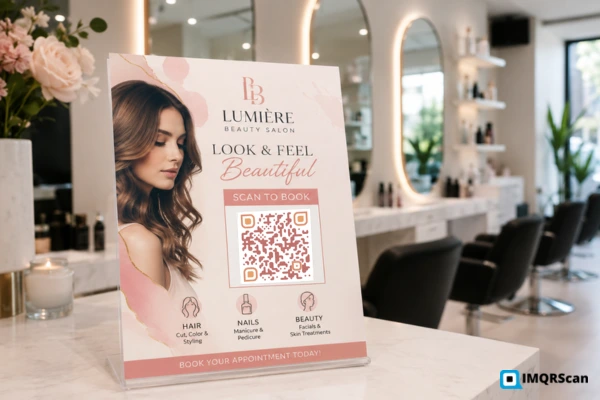
A QR code for salon marketing helps clients book appointments, view prices, contact a stylist, connect to Wi-Fi, or leave a review with one scan.

With IMQRScan, salon owners can create branded static or dynamic QR codes for booking links, Google reviews, WhatsApp chats, Instagram profiles, price lists, Wi-Fi, and digital business cards.

Add your logo, use your salon colors, download a print-ready file, and place the code on mirrors, windows, appointment cards, flyers, receipts, product shelves, or business cards.

A dynamic QR code for salon use can also be updated after printing. It can show scan activity, so you can compare cards, flyers, signs, and other placements.

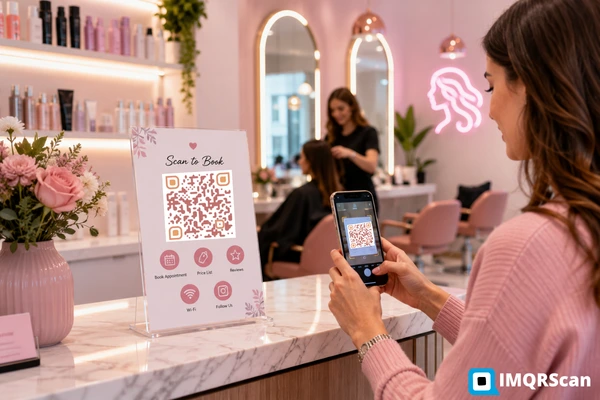
QR code for salon appointment booking on a reception desk
Quick Answer

What can a salon QR code do?

A QR code for salon use is a scannable code that opens a booking page, service menu, price list, Google review form, WhatsApp chat, Instagram profile, Wi-Fi login, map location, or digital business card.

For long-term salon marketing, a dynamic code is often the better choice because you can update the destination and review scan data without printing a new code.

Definition

What Is a QR Code for Salon Use?

A QR code for salon use is a square code that connects a physical salon item to a digital page or action.

A client scans the code with a phone camera. The phone then opens the linked page. This may be a booking tool, price list, review page, social profile, contact card, Wi-Fi network, payment link, or location map.

The client does not need to type a long website address. They do not need to search for the salon name. They also do not need to save a stylist’s number by hand.

A good salon QR code should have one clear purpose. It may help a client book now, check prices, see recent work, contact the salon, or leave feedback.

Key takeaway: The best salon QR code is not the most complex one. It is the code that makes the next client action faster.
IMQRScan for Salons

How IMQRScan Helps Salons Use QR Codes

IMQRScan is a dynamic QR code generator for businesses, marketers, and service providers. A salon can use it to connect printed material with booking pages, reviews, messages, portfolios, prices, Wi-Fi, directions, and contact details.

You can create a static code when the information will stay fixed. You can create a dynamic QR code when you want to edit the destination later or view scan analytics.

This matters for printed cards and signs. A salon may change its booking tool, service menu, website page, or campaign offer. A dynamic code lets you update the destination in the IMQRScan dashboard instead of printing everything again.

IMQRScan does not replace your website, booking system, Google Business Profile, or social page. It gives clients a faster way to reach them.

Useful IMQRScan Features for Salons

Static and dynamic codes
Editable destinations
Scan analytics
Custom colors and logo
Frames and call-to-action text
PNG, SVG, and PDF files
QR code folders
Multi Language QR
Best Uses

Best Uses for a QR Code for Salon Marketing

Start with the client action that matters most. A salon does not need to launch every idea at once.

QR code for salon appointment booking on a reception desk
Place a booking or service menu QR code where clients can see it before they leave.

1. Appointment Booking QR Code

A booking QR code for salon services can open your online calendar. The client can choose a service, date, time, location, and stylist.

It can link to Fresha, Booksy, Square Appointments, Vagaro, Calendly, or a booking page on your own website.

Good placements include:

  • Front window
  • Reception desk
  • Appointment cards
  • Business cards
  • Flyers and posters
  • Printed price lists

Link directly to the booking page. Do not send the client to a general home page and make them search for the appointment button.

Best practice: Test the complete booking process on a phone. The code may work while the booking page is still slow or difficult to use.
2. Salon Price List QR Code

Printed menus can become old. Prices change. New services are added. Seasonal offers end.

A dynamic QR code for salon price lists can open a live service page that you update when needed.

The page may include:

  • Haircut prices
  • Hair color packages
  • Nail and makeup services
  • Barber services
  • Bridal packages
  • Add-on treatments
  • Current offers

Show a starting price when the final cost depends on hair length, time, product use, or stylist level.

Use the URL QR Code Generator to connect your printed service menu to the current online page.

3. Google Review QR Code

Reviews help new clients understand what to expect. A review QR code for salon customers can open the correct Google review form.

Place it near:

  • The payment desk
  • The receipt
  • A thank-you card
  • A mirror sticker
  • An after-service message
Happy with your visit? Scan to share an honest review.

Create a Google Review QR Code with IMQRScan and link it to the correct Google Business Profile.

Ask for honest feedback. Do not offer a reward only for a positive review. Google explains review rules and business profile support in its Google Business Profile Help.

Reply to both positive and negative reviews. Keep public replies calm and do not share private client details.

4. WhatsApp Contact QR Code

Many clients prefer a short message instead of a phone call. A WhatsApp QR code for salon contact can open a chat with a ready message.

Hi, I would like to ask about an appointment.

It can help with:

  • Booking questions
  • Hair color consultations
  • Bridal packages
  • Home service requests
  • Product orders
  • Rescheduling

Use the WhatsApp QR Code Generator to add the salon number and an optional message.

Set clear office hours. Do not promise immediate replies when the salon is closed.

5. Instagram Portfolio QR Code

Hair, barber, nail, beauty, and makeup work is visual. Clients often want to see real results before booking.

An Instagram salon QR code may open:

  • The main salon profile
  • A stylist profile
  • A Reel or Highlight
  • A before-and-after post
  • A bridal or nail art portfolio

Use the Instagram QR Code Generator to send clients to the exact profile or post that supports the printed offer.

A direct portfolio page can work better than a general profile when the campaign is about one service.

6. Wi-Fi, Contact, and Location QR Codes

A Wi-Fi QR code for salon waiting areas lets clients connect without typing the network name and password.

A digital contact code can store a stylist’s name, phone number, email, booking link, social profiles, and salon address.

A location code can open Google Maps or another map service. This is useful when the salon is inside a mall, hotel, office tower, or large building.

Use the Wi-Fi QR Code Generator for guest internet access. Use a guest network when possible.

Check the map pin and Wi-Fi details before printing. Test again after changing a password or moving the salon entrance.

Step-by-Step

How to Create a QR Code for Salon Use With IMQRScan

You do not need coding or design skills. The setup takes only a few steps.

Step 1

Choose One Goal

Decide what the code should do.

  • Book an appointment
  • Open a price list
  • Start a WhatsApp chat
  • Leave a Google review
  • View an Instagram portfolio
  • Connect to Wi-Fi
Step 2

Add the Correct Destination

Open the matching IMQRScan QR generator.

Paste the booking page, review page, social link, or other destination.

Make sure the page works well on a phone.

Step 3

Choose Static or Dynamic

Use static when the information will stay fixed.

Use dynamic when you want to edit the link, track scans, or keep the same printed code for a long time.

Dynamic is often better for booking, prices, cards, signs, and campaigns.

Step 4

Customize the Design

Add your salon logo and brand colors.

Keep a dark code on a light background.

Use a frame and text such as “Scan to book” or “Scan for prices.”

Step 5

Test the Code

Test it on Android and iPhone.

Test it in the light and at the distance clients will use.

Check the full action after the scan, not only whether the link opens.

Step 6

Download and Print

Use PNG for websites, email, and social graphics.

Use SVG or PDF for sharp printing.

Print one sample before ordering many cards, stickers, signs, or flyers.

Best practice: Give each QR code for salon use one main goal. A clear single action is easier for clients to understand.
Business Cards

Barber and Hair Stylist Business Cards With QR Code

Business cards are one of the most useful places to add a salon QR code because clients can scan and take action while the card is still in their hand.

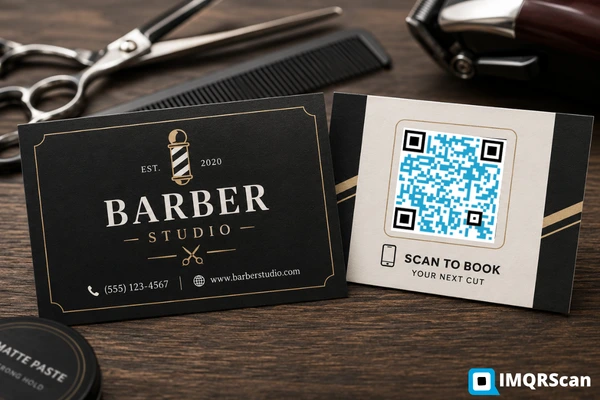
Barber business cards with QR code for booking, reviews, and contact details

Barber Business Cards With QR Code

Barber business cards with QR code designs can link to booking, a haircut gallery, Instagram, WhatsApp, reviews, service prices, directions, or a digital contact card.

Put the code on a clean part of the card. Do not place it over a beard photo, dark pattern, or busy background.

Scan to book your next cut.

Keep the barber’s phone number or website on the card as a backup. The code should make contact easier, but it should not be the only option.

Start with a printed QR code size of about 25 mm by 25 mm, or one inch square. Use a larger size when the design includes a logo.

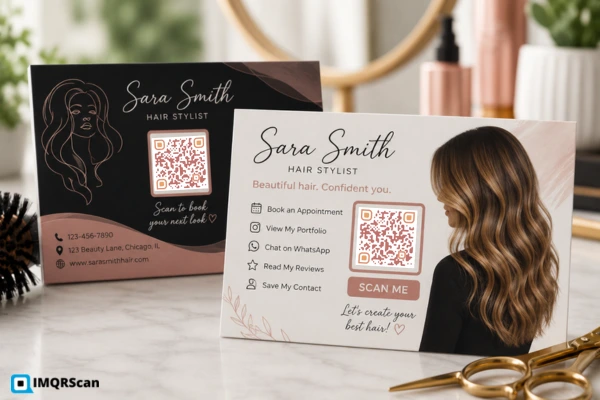
Hair stylist business cards with QR code for portfolio, booking, and contact details

Hair Stylist Business Cards With QR Code

Hair stylist business cards with QR code designs can open a personal booking page, Instagram portfolio, hair color gallery, salon profile, WhatsApp chat, client reviews, or digital contact details.

Use one main call to action. Good examples include:

  • Scan to book with Sara
  • View my hair portfolio
  • Save my contact
  • Ask about hair color
  • See my latest work

These cards are useful for salon employees and freelance stylists. They also work at weddings, photoshoots, beauty events, training classes, home visits, and local networking events.

This page targets both business card terms because they fit the wider salon topic and do not need separate thin pages right now.

Placement Guide

Where Should You Place a QR Code for Salon Use?

Place the code where the client has time, a clear reason to scan, and a useful next step.

Placement Best goal Call to action
Front windowBooking or servicesScan to book
Reception deskBooking or price listView services
Mirror stationPortfolio or rebookingSee our work
Checkout deskReview or loyaltyShare feedback
Appointment cardRebookingBook your next visit
Business cardContact or portfolioSave and book
Waiting areaWi-Fi or menuConnect to Wi-Fi
Product shelfProduct detailsLearn how to use
ReceiptReview or feedbackTell us how we did
FlyerOffer or directionsScan for details

Front Window

A window QR code for salon booking can work when the salon is closed.

Closed right now? Scan to book online.

Make the code large enough to scan through the glass and test it from outside.

Checkout and Reception

Reception is useful for booking, service menus, and loyalty. Checkout is useful for reviews, feedback, rebooking, and product orders.

Do not place too many codes together. Choose the most useful action for that place.

Compare

Static vs Dynamic Salon QR Codes

Feature Static QR code Dynamic QR code
Change destination laterNoYes
Track scan activityUsually noYes
Best for fixed informationYesYes
Best for long-term printLimitedBetter
Useful for price listsRisky if the link changesBetter
Useful for business cardsYesBetter for updates

A static code can work for fixed details, such as Wi-Fi information that will not change.

A dynamic QR code for salon marketing is often better for booking pages, price lists, offers, business cards, staff pages, review campaigns, window signs, flyers, and printed menus.

Key takeaway: Choose a dynamic code when replacing the printed item would cost more than updating the destination.
Design and Printing

How to Design a Salon QR Code That Scans Well

Use Strong Contrast

Dark code colors on a light background work best. Light pink on white may match the brand but can be difficult for a phone camera to read.

Leave a Quiet Zone

The empty border around the code helps the phone find its edges. Do not place text, photos, borders, or patterns too close.

Choose the Right Size

A business card code can start at about 25 mm wide. A wall sign must be larger because the scan distance is longer.

Add the Logo Carefully

Keep the logo small and do not cover too much of the code. Test every logo version before printing.

Avoid Busy Backgrounds

Place the code on a plain light box. Avoid hair photos, marble patterns, shiny metal, dark product images, and glass reflections.

Add Clear Text

“Scan me” does not explain the benefit. Use text such as “Scan to book”, “Scan for prices”, or “Leave a review”.

Best practice: Test the final printed card, sign, sticker, or flyer. A code that works on a screen may fail after printing if it is too small or blurry.
Tracking

How to Track QR Code for Salon Results

Scan data is useful, but completed client actions matter more.

Use Different Codes for Important Placements

Create separate dynamic codes for:

  • The front window
  • Business cards
  • Receipts
  • Flyers
  • Product shelves

When every item uses the same code, you can see total scans but not which placement brought them.

A QR code for salon campaign with 20 scans and eight bookings may be better than one with 200 scans and no bookings.

Goal Metric to watch
Appointment bookingCompleted bookings
Google reviewsNew review count
InstagramProfile visits or follows
WhatsAppUseful chats started
Price listPage views
Loyalty programNew sign-ups
Product pageOrders or visits

Privacy and Safety

Only collect information you need. Explain why you ask for a name, phone number, email, or service preference. Use secure HTTPS pages. Do not place client names or private appointment details inside a public QR code.

Check public window and payment codes often. A damaged code or false sticker can send clients to the wrong page.

Final Takeaway

Use a Salon QR Code to Make One Client Action Easier

A QR code for salon marketing should reduce a step. Start with booking, prices, WhatsApp, reviews, or a portfolio.

Create the code with IMQRScan, add clear text, test the printed design, and keep a phone number or short link as a backup.

The best salon QR code is the one clients can see, understand, trust, and scan.

Simple Launch Plan

Start with one QR code for salon bookings at reception or on the front window. Add a second QR code for salon reviews near checkout after staff are comfortable using the first code.

Review the scan and booking results after a few weeks. Then add a third QR code for salon prices, WhatsApp, Wi-Fi, or stylist profiles only when it solves a clear client need. This keeps the setup simple and makes each code easier to measure.

FAQ

Frequently Asked Questions

A booking QR code is often the best first choice because it gives clients a direct path to an appointment. A dynamic code is useful when the booking link may change or when you want scan analytics.

Choose one goal, add the correct destination to IMQRScan, choose static or dynamic, customize the design, test it on several phones, and download PNG, SVG, or PDF.

Yes. It can open Fresha, Booksy, Square Appointments, Vagaro, Calendly, or a booking page on your own website.

Yes. Use strong contrast, clear call-to-action text, and a printed size of about 25 mm by 25 mm or larger.

They can link to booking, a haircut portfolio, WhatsApp, Instagram, Google reviews, service prices, directions, or digital contact details.

They can link to a personal booking page, Instagram portfolio, hair color gallery, salon profile, WhatsApp chat, reviews, or contact details.

You can change the destination when you use a dynamic QR code. A static code cannot be edited after it is created.

Useful placements include the front window, reception desk, mirrors, checkout area, appointment cards, business cards, receipts, product shelves, and flyers.

Create Your Salon QR Code With IMQRScan

Add your booking page, price list, review link, WhatsApp number, Instagram profile, Wi-Fi details, or salon location.

Need editable links and scan analytics? View IMQRScan pricing plans.