Voucher QR Code Generator With Unique, One-Time Codes
A voucher QR code lets customers claim a voucher with their email and get their own unique code, which your staff redeem once. Set up your voucher in the generator below, then download the QR code as PNG or SVG.
Every claim and redemption shows in your dashboard. Need one shared discount code for everyone instead? Use the coupon QR code generator.
What Is a Voucher QR Code?
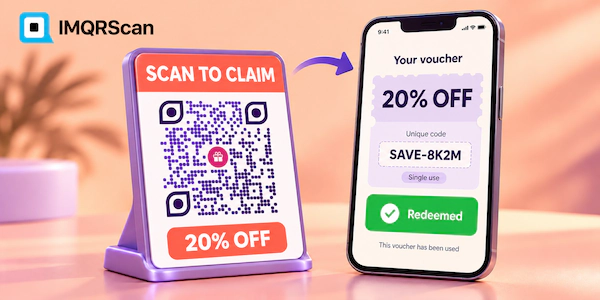
A voucher QR code is a QR code that gives each person who scans it their own voucher with a unique code, which can be redeemed only once. It is the answer to QR code coupon redemption: you always know who claimed and who already used their reward.
With IMQRScan, the voucher is a mobile page we host for you. The customer scans, enters their email, and gets a unique code on screen. At the counter, your staff type the staff PIN on the customer’s phone, or find the code in your dashboard, and the voucher is marked as redeemed.
You can limit how many vouchers exist, set a claim and redeem until date, and export every claim as a CSV file.
How to Create a Voucher QR Code in 4 Steps
Use the generator at the top of this page. The steps match its buttons.
- Step 1
Add your business and voucher
In the generator above, add your logo, cover image, business name, the voucher, such as Free dessert with any main, and an optional value.
- Step 2
Set the rules
Add how it works, the claim and redeem until date, how many vouchers in total, and your terms. Tick Also ask for a phone number if you need it.
- Step 3
Set the staff PIN and design
Choose a 4 to 8 digit staff PIN for redeeming, then open Design for colors, shapes, and a frame.
- Step 4
Download QR code
Press Download QR code, create a free account if you have none, and save it as PNG or SVG.
How Claiming and Redeeming a QR Code Voucher Works
A voucher QR code has two moments: the customer claims it, and your staff redeem it once.
The customer claims
- Scans the voucher QR code.
- Sees your offer and terms.
- Enters their email, and phone if you ask.
- Gets a unique voucher code on screen.
Your staff redeem
- The customer shows the voucher.
- Staff type the staff PIN on the customer’s phone,
- or find the code in the dashboard Vouchers page.
- The voucher is marked redeemed and cannot be used again.
If someone tries the same voucher twice, the dashboard shows when it was already redeemed.
What You Can Set on a Voucher QR Code
| Setting | What it does | Limit |
|---|---|---|
| Voucher | The reward, such as Free coffee | Up to 100 characters |
| Value | An optional value, such as AED 50 | Up to 40 characters |
| How it works | The steps to claim and use it | Up to 400 characters |
| Claim and redeem until | The last date to claim and use it | Optional |
| How many vouchers in total | Stops claims when they run out | Optional |
| Ask for a phone number | Collects a phone number with the email | Optional |
| Staff PIN | The PIN your staff type to redeem | 4 to 8 digits |
| Terms | Who can use it and where | Up to 600 characters |
Every claim gives you a customer email, so a voucher QR code also grows your mailing list.
Voucher QR Code or Coupon QR Code?
Choose a voucher QR code when each customer must get their own code that works once, and a coupon QR code for one shared discount.
| Voucher QR code (this page) | Coupon QR code | |
|---|---|---|
| Code | A unique code for each customer | One shared code for everyone |
| Redeemed once | Yes, staff redeem each code once | No, the shared code can be reused |
| Customer data | Email, and phone if you ask | None |
| Limit the total | Yes, set how many vouchers | No |
| Best for | Free items, gifts, launches, limited stock | Online discount codes and seasonal sales |
Just need customers to copy one discount code? Use the coupon QR code generator.
A Voucher Code Generator That Works From a QR Code
You do not need to prepare a list of codes: each claim creates its own unique voucher code automatically.
Spreadsheets of codes get shared, lost, or used twice. With a voucher QR code, the code is created when the customer claims it and linked to their email. Your staff see the code, the claim time, and whether it was redeemed.
When the campaign ends, export the claims as CSV for your records, your loyalty list, or your email tool.
How a Restaurant Runs a Free Dessert Voucher Without Abuse
A restaurant can offer 200 free desserts from one printed voucher QR code and still give each guest only one.
- The voucher says Free dessert with any main, limited to 200 vouchers, valid until the end of the month.
- The code goes on flyers and the restaurant’s Instagram story.
- Guests claim it with their email and show the unique code at the table.
- The waiter types the staff PIN on the guest’s phone, and the voucher is redeemed.
- After the month, the owner exports 200 emails for the next campaign.
Where to Use a QR Code Voucher
Launches and grand openings
A limited number of free items for the first visitors.
Events and trade shows
One gift per visitor, redeemed at the booth.
Partner and influencer offers
Track exactly how many vouchers each partner brings.
Loyalty rewards
A thank-you reward that cannot be shared and reused.
Tips for a Voucher QR Code That Works Smoothly
- Train staff on the PIN: show them how to redeem on the customer’s phone before the campaign starts.
- Keep the PIN private: change it if it leaks, and never print it.
- Set a total and a date: limited vouchers create urgency and protect your stock.
- Say the reward next to the code: Scan to claim a free dessert gets far more claims than a bare code.
- Test the full flow: claim one voucher yourself and redeem it, so you see what customers and staff see.
What a Voucher QR Code Cannot Do
A voucher QR code controls claims and one-time redemption. It does not connect to your till or online checkout.
- Redemption happens with the staff PIN or in the dashboard, not automatically at a payment terminal.
- One person could claim with several email addresses. A total limit and a short date keep this small.
- It is not a gift card with a stored balance. Each voucher is redeemed once.
- It is a Smart code, so it needs an active plan to stay online. The Free plan lets you try it with 5 Smart codes and 15 tracked scans.
How Much Does a Voucher QR Code Cost?
You can try a voucher QR code free, and paid plans start at $2.99 a month, billed annually.
| Plan | Free | Starter | Professional | Plus |
|---|---|---|---|---|
| Price (billed annually) | $0 | $2.99 / month | $10 / month | $33.33 / month |
| Smart QR codes | 5 | 50 | 250 | 500 |
| Tracked scans | 15 | 500,000 a year | 1,000,000 a year | 2,000,000 a year |
| Scan analytics history | 14 days | 60 days | 90 days | 180 days |
See every detail on the pricing page.
What Else Can a Voucher QR Code Do?
A voucher QR code gives every customer one reward and you a list of every claim. IMQRScan adds rules that control when vouchers run and where each market goes.
Schedule and Scan Limits
Open claims on a launch day and close them automatically when the campaign ends.
Country Rules
Send visitors from each country to a voucher in their language from one printed code.
Multi-Language Pages
Show the voucher page in the languages your customers read, so everyone understands the terms.
More Tools in IMQRScan
Built-in QR Templates
Ready-made designs with colors, frames, and logo placement set.
Multiple QR Shapes
Dot, corner, and frame shapes that match your brand and still scan.
Free Print Templates
Flyers, posters, and table tents with your code already placed.
QR Stickers
Sticker-ready designs for labels, packaging, doors, and windows.
Retargeting Pixels
Meta, GA4, Google Ads, TikTok, and LinkedIn pixels on every scan.
PIN Protection
Ask for a PIN before the content opens.
Custom Domain
Use your own domain for the short link behind the code.
Team and Users
Invite teammates and give each one a role.
QR Code API
Create and manage codes from your own software.
Free on every plan
- Built-in QR templates
- Multiple QR shapes
- Free print templates
- QR stickers
- Multi-language landing pages
Free plan includes
- Unlimited static QR codes
- 5 Smart (dynamic) QR codes
- 15 tracked scans
- 14 days of scan analytics
- Bulk creation, 5 per upload
- File uploads up to 5 MB
Professional plan and up
- PIN protection
- Schedule and scan limits
- Country rules
- Retargeting pixels
- QR Code API
- Team management and roles
- Custom domain add-on from Starter ($10/month)