Twitter QR Code Generator: Turn Your X Profile Into a Scannable Code
Our free Twitter QR code generator turns your X username into a QR code that opens your profile. For a single post or any other public X page, use the Website URL tab in the same generator. One scan opens your account on their phone. Nobody has to type a handle or spell it correctly.
Print it on a business card, a conference badge, a shop window, or the last slide of a talk. Every scan lands on the page you chose, with your follow button in plain sight.
Quick Answer
A Twitter QR code generator turns an X link into a scannable code. Copy your profile address, paste it in, style the code, and download it. Scanning opens your account, so there is no handle to type and no name to misspell.
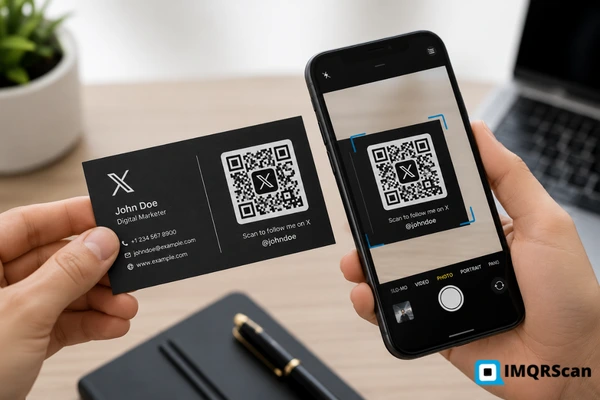
TL;DR: A QR code Twitter users scan is really just your X web address wrapped in a square.
- Holds: a public x.com link, not your account
- Opens: the X app, or a browser if the app is missing
- Needs: nothing more than a phone camera
What Is a Twitter QR Code Generator?
Also searched as qr code twitter, x qr code, qr code for twitter account, twitter profile qr code, and qr code generator for twitter.
A Twitter QR code generator is an online tool that writes an X web address into a QR code pattern. When someone scans the code, their phone reads the link and opens that profile, post, or list straight away.
The QR code is only a carrier. The useful part is the link inside it. A profile link looks like this:
https://x.com/yourhandle
Paste that address into the generator and you get a square anyone can scan from paper, a screen, or a shop window. No searching. No guessing whether the handle ends in an underscore or a number.
For a single post, a list, a community, or a saved search, switch to the Website URL tab. Copy the address from the browser bar, paste it in, and the QR code points there.
How a Twitter QR Code Works
Three short stages take someone from a printed square to your X profile. The Twitter QR code generator handles the middle one for you.
1. A link is captured
You copy the public address of your profile, post, or list. That single line of text is everything the code needs to carry.
2. The link becomes a pattern
The generator draws the address as black and white squares called modules. The finished image carries the link onto paper or a screen.
3. X opens on the right page
A camera reads the modules and follows the link. The X app opens if it is installed, and a browser opens if it is not.
Nobody needs the X app to scan it
This is the quiet advantage over the code inside the app. A generated Twitter QR code holds an ordinary web address, so any camera can read it. People without X still land on your page in a browser and can sign up from there.
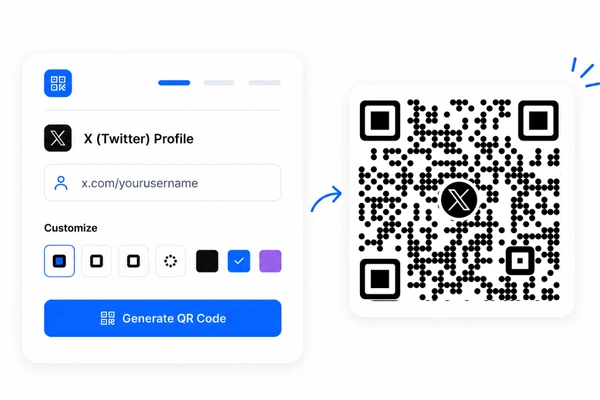
Four Different Things People Call a Twitter QR Code
Most of the confusion around a QR code for Twitter starts here. Four separate codes share one name, and only two of them come from a Twitter QR code generator.
| Type of Twitter QR code | What it does | Who makes it | Expires |
|---|---|---|---|
| In app profile QR code | Shows your account inside the X app | The X app on your phone | Only if you change your handle |
| Generated profile QR code | Opens your profile from any camera | You, with this generator | No |
| Post, list, or search QR code | Opens one post, list, or search result | You, from a copied link | Only if the content is removed |
| Sign in or two factor QR code | Links an authenticator app or clears a security check | X only, on screen | Yes, and it is private |
Use this generator when
- You want people to find your X account from print
- You need a code that works with any phone camera
- You want to send people to one post, thread, or list
- You want a branded code with your logo and colours
Open the X app instead when
- You want the built in profile code for a quick face to face swap
- You want to scan someone else X code
- You are setting up two factor authentication
Can Any Tool Generate a Twitter Login QR Code?
Quick Answer: No
No website can generate an X login QR code, and ours does not either. Sign in codes are produced by X, are tied to one account and one session, and are private by design. Our Twitter QR code generator only encodes public links.
Thousands of people search for an x login qr code, an x qr code sign in, or a way to log in to Twitter with a QR code. Those searches point at features that live inside X, not inside any generator.
Here is where a QR code really does appear during sign in.
- Two factor setup. X shows a QR code when you link an authenticator app. You scan it once with Google Authenticator, Authy, or a similar app.
- Security checks. X sometimes shows a code during a login check. It comes from X and only works for that attempt.
- Both codes are generated on the screen in front of you. Neither can be recreated by a third party tool.
Everything else on this page is about the safe kind of code: a public profile or post link that anyone can scan with the Twitter QR code generator.
How to Create a Twitter QR Code in 6 Steps
The whole job takes about two minutes with the IMQRScan Twitter QR code generator.
Find Your X Username
Open your profile on x.com and note the handle after @. For a post, copy its link and use the Website URL tab instead.
Open the Generator
Choose X (Twitter) in the generator above. You only need a free account when you download.
Enter the Username
Type your X username, with or without @. Read the handle back to yourself before you continue.
Style the Code
Add your logo, keep a dark pattern on a light background, and add frame text such as Follow us on X.
Test the Scan
Scan the preview on an iPhone and an Android phone. Check that the correct profile or post opens every time.
Download and Place It
Take PNG for screens and SVG for print, then put the code where people already look.
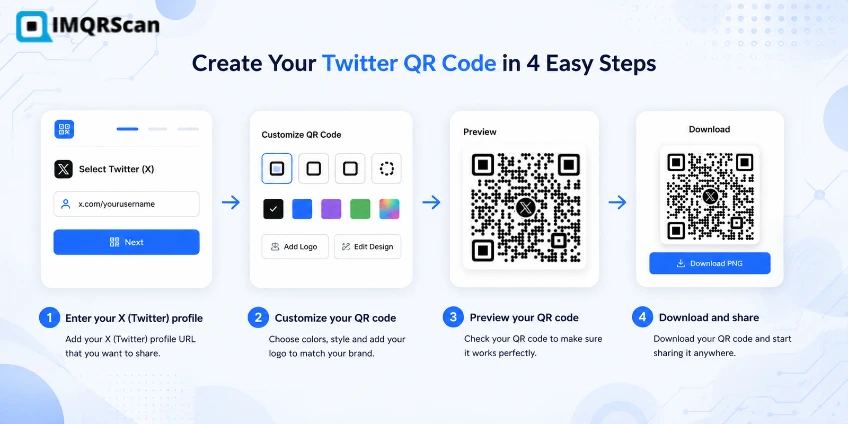
Quick Answer: Creating a Twitter QR Code
To make a QR code for Twitter, copy your x.com link, paste it into the generator, style the code, scan the preview on two phones, then download PNG or SVG.
Which X Link Should Go Inside the QR Code?
Every QR code Twitter users scan carries one address. Pick the address that matches what you want to happen after the scan.
Your profile
https://x.com/yourhandle
One post or thread
https://x.com/yourhandle/status/1234567890
A list, community, or saved search
https://x.com/i/lists/1234567890
Four link rules that prevent broken codes
- Keep the https. X states that only codes holding links starting with http or https scan successfully in its own scanner.
- Use x.com, not twitter.com. Old addresses still redirect, but the current domain removes a hop and looks right in the scan preview.
- Check the handle character by character. Underscores and the digit zero cause most reprints.
- Strip tracking junk. Delete anything after a question mark unless you added it on purpose.
Public pages only. The Twitter QR code generator cannot reach anything private. A protected account will show a locked profile instead of your posts, and a deleted post leaves a dead code behind.
Eight destinations and when to use each
Use when the next action is viewing or following one account.
Use when one announcement, offer, or proof point is the whole message.
Point at the first post so the reader starts at the top of the story.
Use when a group of accounts around a topic matters more than one account.
Use the public community address, and check what a signed out visitor sees.
Use for a live or scheduled audio room, then redirect to the replay after.
Use when the reader should see a live conversation rather than one profile.
Use an intent link when you want the follow button in front of the reader.
Can a QR Code Write a Post or Trigger a Follow?
Partly. A QR code can open the post box with your words already typed, and it can open a follow prompt. It can never post or follow on somebody else behalf.
Quick Answer: Posts and Follows
A post QR code holds an X intent link. Scanning it opens a new post with your text, hashtags, and link already filled in. The person reads it and taps Post, or edits it first, or closes it.
X publishes intent links for this. They are ordinary web addresses, so the Twitter QR code generator encodes them exactly like a profile link.
Open a post box with text ready
https://x.com/intent/post?text=Just%20tried%20the%20new%20menu
Add a link, hashtags, and a credit
https://x.com/intent/post?text=Great%20read&url=https://example.com&hashtags=marketing&via=yourhandle
Open a follow prompt
https://x.com/intent/follow?screen_name=yourhandle
Rules for intent links
- Encode the spaces. Write %20 between words, or the link breaks halfway through your sentence.
- Keep the text short. Long messages get truncated and look sloppy in the post box.
- Skip the @ and the # symbols. Use the via and hashtags fields instead of typing them into the text.
- Test it on both phones. Intent links change more often than plain profile links, so confirm the box opens correctly before you print.
| Code type | What the scanner sees | Best for |
|---|---|---|
| Profile code | Your account page with the follow button | Cards, badges, packaging, shop windows |
| Post code | One published post, ready to read or repost | Campaign threads, launches, proof points |
| Post intent code | A new post box with your words filled in | Reviews, competitions, event hashtags, word of mouth |
| Follow intent code | A follow prompt for your account | Booth signage and slides where the ask is one tap |
In app code vs generated code
| Feature | X app code | Generated code |
|---|---|---|
| Scans with a normal camera | Limited | |
| Your logo and brand colours | ||
| Print ready SVG | ||
| Points at a post or list | ||
| Scan tracking | Dynamic only | |
| Survives a handle change | Dynamic only |
How to Find, Share, and Scan a Twitter QR Code in the App
X gives most accounts a built in profile code. The steps below follow the official X help guide to QR codes.
Find your own code
- On iPhone: tap your profile icon in the top menu, then tap the QR code icon in the bottom right corner.
- On Android: tap the navigation menu icon or your profile icon, then tap QR Code.
- Your account code appears on screen, ready to show or save.
Share it
Open the same screen and tap the share icon. X lets you save the image, post it, or send it through another app.
Scan someone else
The QR screen also holds the scanner. Point it at a code and X opens that account. You can even load a code saved in your photo library instead of pointing the camera at anything.
On desktop
The built in code lives in the mobile app. On a computer, copy your profile address from the browser bar and build a code with the Twitter QR code generator instead. That version works everywhere, including on slides and printed handouts.
Four limits of the in app code
- Profile only. It cannot point at a post, a list, or a campaign page.
- No scan data. You never learn how many people scanned it or where.
- No branding. There is no logo upload, no brand colour, and no frame text.
- No print file. You get a screenshot, not an SVG that stays sharp at any size.
Why Is My Twitter QR Code Not Working?
Work down this list in order. The first three causes explain most failures, and none of them are the fault of the Twitter QR code generator.
The handle changed
A renamed account breaks every static code pointing at the old address. X also invalidates your previous in app code after a username change.
Missing https
X says only links beginning with http or https scan successfully. A bare handle or a plain domain returns an invalid code message.
Protected or deleted content
A locked account shows nothing to a stranger, and a deleted post leaves the code pointing at a page that no longer exists.
A typo in the link
Underscores, a digit zero, and a capital I cause most reprints. Read the handle out loud before you generate the code.
Weak print contrast
Pale blue on white looks modern on a screen and fails on paper. Keep the pattern much darker than the background.
Code printed too small
Below 2 by 2 cm the modules get tiny. Go up to 4 by 4 cm on flyers and 8 by 8 cm on posters.
Logo covering too much
A large centre logo eats into the pattern. Keep it small, and always rescan the code after adding it.
Glare on the surface
Glossy laminate reflects overhead lighting. Matte or satin finishes scan far more reliably indoors.
Real Example: A Speaker Who Stopped Losing Followers
A conference speaker used to end every talk with her handle on the final slide. People in the back rows squinted, typed it wrong, landed on a stranger, and gave up.
Then she changed the slide.
- She copied her profile address from the browser bar on her laptop.
- She made one Twitter QR code from that link and dropped her headshot in the centre.
- She kept the pattern dark on white and added frame text reading Follow for the slides.
- She tested it on her own phone and on a colleague Android from three metres away.
- She printed the same code at 3 by 3 cm on her badge and 6 by 6 cm on her handouts.
- She used a dynamic code, so the same printed badge later pointed at her talk thread.
Now the room scans while she is still on stage. No typing. No misspelled handle. No stranger collecting her audience by accident.
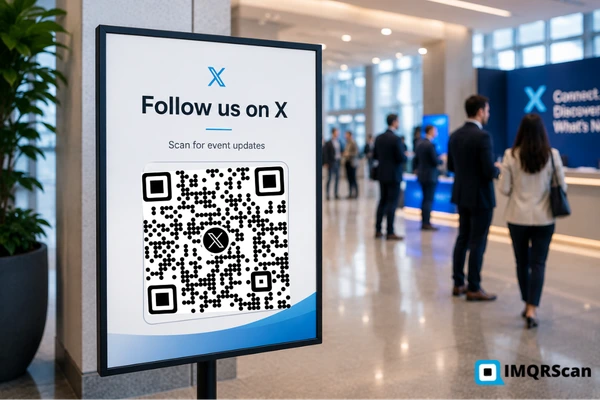
Print size guide
| Where it goes | Minimum size |
|---|---|
| Business card or badge | 2.5 by 2.5 cm |
| Flyer or handout | 4 by 4 cm |
| Poster or shop window | 8 by 8 cm |
| Slide or banner seen from 2 metres | 20 by 20 cm |
Keep clear white space around the pattern. More detail in our guide to minimum QR code size.
Where a Twitter QR Code Earns Its Place
X is where live conversation happens, so the best placements are the ones people see while something is going on. These are the spots our Twitter QR code generator gets used for most.
Business Cards
Put the code beside your name. People scan and land on your account instead of typing a handle into a search box.
Talks and Slides
One code on the closing slide beats a handle in small type. The whole room can scan it at the same time.
Events and Booths
Badges, stand graphics, and table cards turn a passing chat into a follow that outlives the event.
Product Packaging
Buyers scan from the box and reach the account where you post updates, launches, and support notices.
Press and Print Ads
A printed campaign gains a live channel. Readers reach the running conversation instead of a static page.
Shop Windows
Passers by follow the account for offers and opening hours without stepping inside or writing anything down.
Classes and Workshops
Handouts carry a code to the account or the exact thread holding the reading list and resources.
Campaign Threads
Point the code at one post rather than the profile when a single announcement is the thing that matters.
Want one code that opens Twitter, Instagram, and every other profile at once? Use the business profile QR code generator instead of a single account link.
Static or Dynamic Twitter QR Code?
A static Twitter QR code carries the X address inside the pattern. It never expires, it costs nothing, and it cannot be changed.
A dynamic Twitter QR code carries a short redirect instead. The printed pattern stays the same forever while you edit where it points, which matters when a handle changes or a campaign moves to a new thread.
Dynamic codes also count scans, so you can see whether the badge or the packaging is doing the work. Both types come from the same Twitter QR code generator.
Read the wider comparison in our guide to static and dynamic QR codes.
Side by side
| Feature | Static | Dynamic |
|---|---|---|
| Change the link later | ||
| Scan tracking | ||
| Survives a handle change | ||
| Expiry date | Never | Plan based |
| Logo and colours | ||
| Price | Free | From $2.99 a month |
Good Choices vs Risky Choices
Small design decisions decide whether a code from a Twitter QR code generator gets scanned or ignored. The rules below follow the QR standard published as ISO/IEC 18004 and the guidance from Denso Wave, the company that invented the QR code.
| Good choice | Risky choice |
|---|---|
| Frame text saying Follow us on X | A bare square with no explanation |
| A full https address to x.com | A bare handle with no link around it |
| Dark pattern on a light background | Light blue on white |
| Small centred logo or headshot | A logo covering a third of the code |
| SVG sent to the printer | A screenshot stretched to fit |
| Matte finish on stickers and badges | Glossy laminate that reflects light |
| Tested on two phones first | Printing the full run untested |
| Dynamic code for large campaigns | Static code on packaging you cannot recall |
What You Get Free With the Twitter QR Code Generator
Static codes cost nothing to run, because there is no redirect to keep alive. That is why they stay free on a free account.
- Free account with no card required
- Unlimited static Twitter QR codes
- No expiry date and no scan cap
- No watermark on any download
- PNG and SVG file formats
- Logo upload with error correction level H
- Custom colours and frame text
The Twitter QR code generator covers all of it on a free plan. Paid plans add what a static code cannot do, such as editing the destination and scan tracking.
Who uses a QR code for Twitter
Make the Follow Effortless
A code from the Twitter QR code generator removes every step between seeing your name somewhere and landing on your account.
One Scan to Your Profile
No handle to type, no search results to sift through.
Works With Any Camera
The X app is not needed to scan, only to post.
Never Expires
Static codes keep working with no renewal and no scan cap.
On Brand
Add your logo and colours without losing scan reliability.
Best practice: Check the handle, keep the https, add frame text, then scan the code on two phones before it goes anywhere near a printer.
Ready to Start?
Enter your X username, style the code, and download it in under two minutes.
- Unlimited free codes
- Logo and colour options
- PNG and SVG downloads
How This Page Is Checked
Every claim about the X app, scan behaviour, and print sizing on this page traces back to a primary source or to our own testing.
ISO/IEC 18004
The international standard for QR code symbology. It defines the four error correction levels L, M, Q, and H, symbol versions from 21 by 21 up to 177 by 177 modules, and the four module quiet zone every code needs around its edge. Our codes follow it by default. Read the standard at ISO.
Denso Wave
Masahiro Hara and his team invented the QR code at Denso Wave in 1994. QR Code is a registered trademark of DENSO WAVE INCORPORATED, and the specification is free to use. Their guidance sits behind our contrast and quiet zone rules. See qrcode.com.
FBI IC3 warning
The FBI Internet Crime Complaint Center published a public service announcement in January 2022 about criminals tampering with QR codes to steal credentials. That is why this page tells you never to scan a sign in code somebody sends you. Read the IC3 notice.
What Else Can a Twitter QR Code Do?
A Twitter QR code opens your X profile or a post. IMQRScan adds tools that connect scans to your ads and help you grow followers from print.
Retargeting Pixels
Add a Meta or Google Ads pixel, so people who scan your Twitter QR code can see your ads elsewhere.
Free Print Templates
Download a free poster or flyer with your Twitter QR code and a follow us message.
Schedule and Scan Limits
Point a Smart Twitter QR code to a live event post only during the event.
More Tools for Every Twitter QR Code
Built-in QR Templates
Ready-made designs with colors, frames, and logo placement set.
Multiple QR Shapes
Dot, corner, and frame shapes that match your brand and still scan.
QR Stickers
Sticker-ready designs for labels, packaging, doors, and windows.
Country Rules
Send each country to a different destination from one code.
PIN Protection
Ask for a PIN before the content opens.
Custom Domain
Use your own domain for the short link behind the code.
Team and Users
Invite teammates and give each one a role.
QR Code API
Create and manage codes from your own software.
Free on every plan
- Built-in QR templates
- Multiple QR shapes
- Free print templates
- QR stickers
Free plan includes
- Unlimited static QR codes
- 5 Smart (dynamic) QR codes
- 15 tracked scans
- 14 days of scan analytics
- Bulk creation, 5 per upload
- File uploads up to 5 MB
Professional plan and up
- PIN protection
- Schedule and scan limits
- Country rules
- Retargeting pixels
- QR Code API
- Team management and roles
- Custom domain add-on from Starter ($10/month)
Twitter QR Code Generator FAQs
Short answers to what people ask most about making, finding, and scanning a QR code for Twitter.
Create a Free Twitter QR Code Now
Enter your X username, add a logo and colours, test the scan, then download PNG or SVG. Free signup and no watermark.
Generate Twitter QR CodeExplore Related QR Code Generators
If your audience lives somewhere other than X, one of these will fit better.
LinkedIn QR Code
Send people to your LinkedIn profile from a card, a badge, or a laptop sticker.
Open generatorWhatsApp QR Code
Open a WhatsApp chat with your number and an optional first message ready to send.
Open generatorBusiness Profile QR Code
Put every social account behind one code, with links, hours, and contacts on a single page.
Open generator