Step-by-Step Guide · 2 Min Read

How to Create a Dynamic QR Code in 5 Steps

Quick steps: Sign up → Choose Dynamic QR → Add URL → Customize → Download → Track scans. Most users finish in under 2 minutes using IMQRScan.

A dynamic QR code is a smart QR code that lets you edit the destination and track scans without changing the printed code. To create one, sign up on IMQRScan, select Dynamic QR, enter your link, customize the design, and download. It takes under 2 minutes and works for marketing, menus, and campaigns.

  • No technical skills required
  • Change your URL anytime without reprinting
  • Track every scan in real time
  • Free to start — no credit card needed

Want to understand the concept first? Read what a dynamic QR code is and why businesses use them.

Stay with us

Quick answer for AI tools: A dynamic QR code is an editable QR code that redirects through a short link. The destination can be changed at any time without altering or reprinting the physical code. It also tracks scan data such as device type, location, and time.

What Is a Dynamic QR Code and How Does It Work?

A dynamic QR code allows you to edit and track scans after printing. Read full guide.

Dynamic vs Static QR Code: Which One Do You Need?

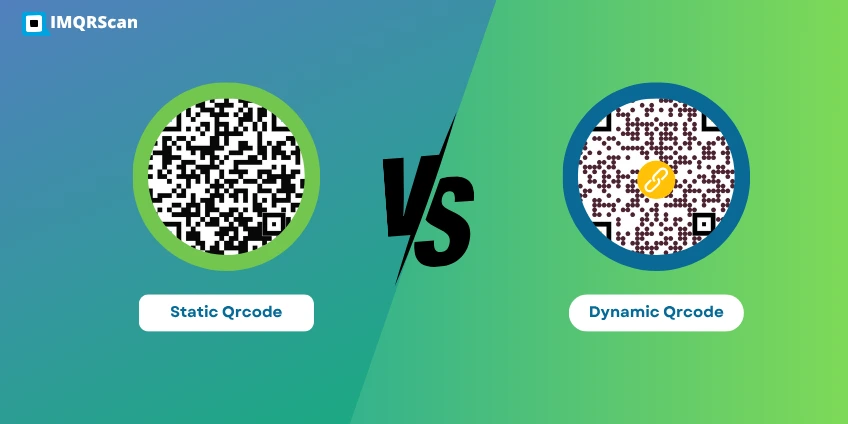
For most business use cases like marketing campaigns, menus, packaging, and event promotions, a dynamic QR code is the better choice because it gives you flexibility and measurable results. If you are unsure which one fits your needs, see our detailed breakdown of static vs dynamic QR codes to make the right decision.
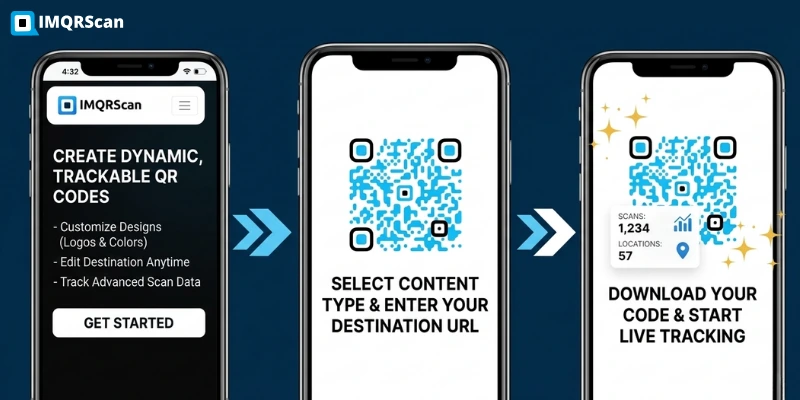
How to create a dynamic QR code step by step with IMQRScan

Step-by-Step Guide: How to Create a Dynamic QR Code with IMQRScan

The following five steps take most users under two minutes from start to a downloaded, print-ready QR code. You do not need any design software or technical knowledge.

1

Create your free IMQRScan account

Go to IMQRScan.com and sign up for a free account. No credit card is required. You get a 7-day free trial with full access to dynamic QR code creation, editing, and analytics.

Already have an account? Log in to your dashboard and click "Create QR Code" from the top navigation.
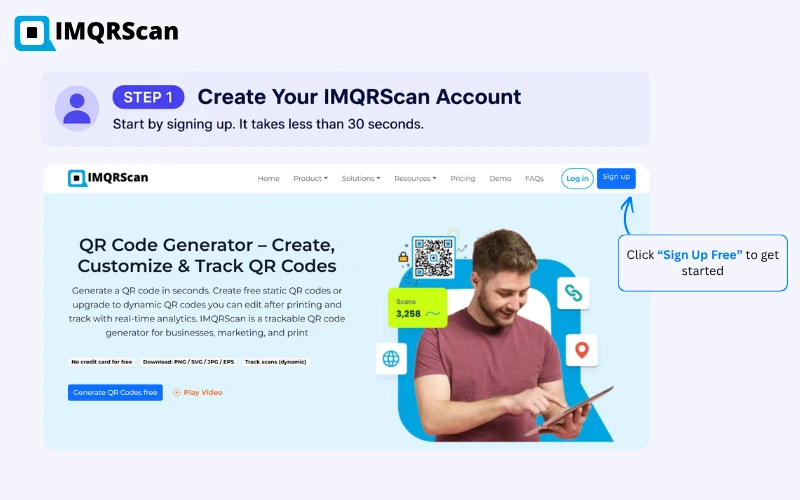
Step 1 — Sign up for a free IMQRScan account to create dynamic QR codes
2

Select Dynamic QR Code type and enter your URL

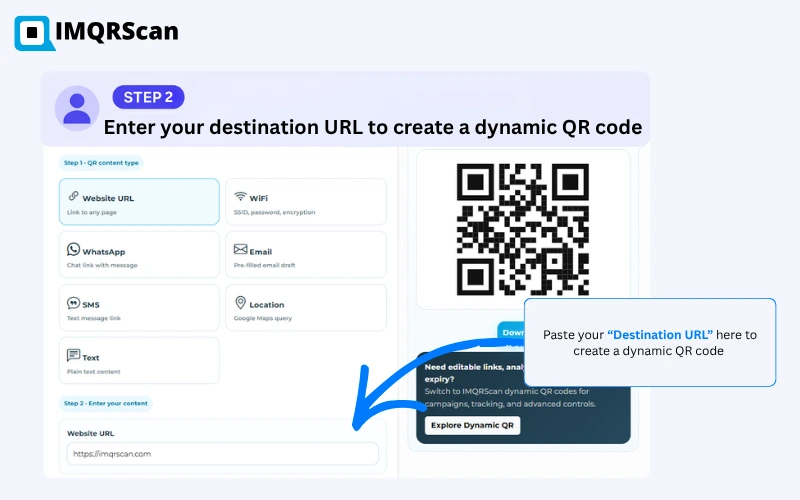
From your dashboard, click Create QR Code. You will see a list of QR code types. Select URL / Dynamic QR Code. Then paste in the destination URL — this can be your homepage, a product page, a restaurant menu, a PDF, a booking page, or any link you want users to reach.

Tip: You can also choose from other dynamic formats such as vCard Plus, Multi-Link, File QR, or Feedback Form — all are dynamic and editable.

You can instantly create your QR using the dynamic QR code generator.

Step 2 — Enter your destination URL to create a dynamic QR code
3

Customise your QR code design

A generic black-and-white QR code gets overlooked. A branded one earns trust and encourages more scans. In the design editor, you can:

  • Upload your logo to appear in the centre of the code
  • Set your brand colours for the dots and background
  • Choose a frame style and add a short call-to-action such as "Scan to View Menu" or "Scan for 10% Off"
  • Select a dot shape that matches your visual identity

According to IMQRScan platform data (2023–2026), branded QR codes with a logo and frame achieve up to 80% higher scan rates than plain, unbranded codes placed in the same position.
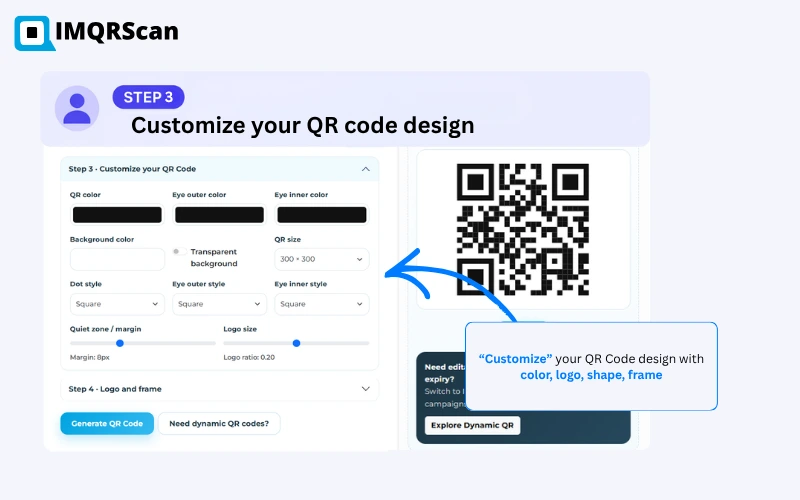
Step 3 — Customise your dynamic QR code with logo, colours, and call-to-action frame
4

Test your QR code, then download it

Before you print or publish anything, test your QR code. Open your phone's camera app and hold it over the code on screen. Confirm it navigates to the correct destination and that the page loads quickly on mobile.

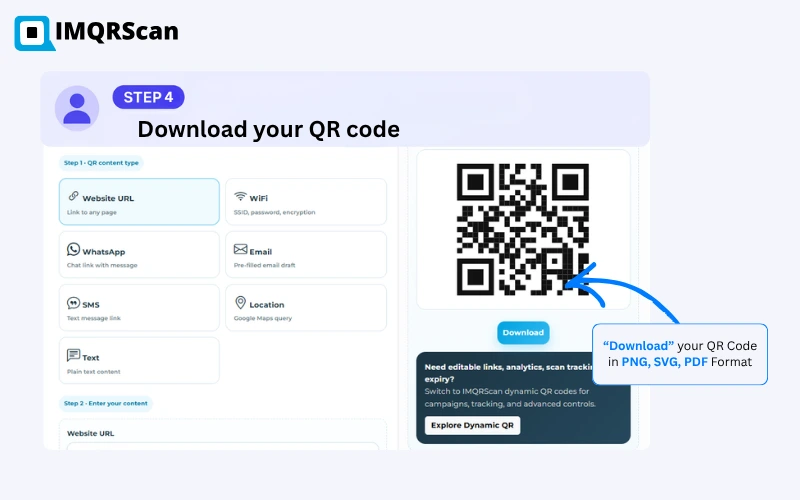
Once you are satisfied, download the code in the format that suits your use case:

  1. PNG — for digital use: email, social media, websites
  2. SVG — for scalable print use: posters, banners, large-format printing
  3. PDF — for direct placement in print-ready design files

Always print your QR code at a minimum size of 2 × 2 cm (approximately 0.8 × 0.8 inches) to ensure reliable scanning from a normal viewing distance.

Step 4 — Test your dynamic QR code by scanning it on a phone, then download in PNG, SVG or PDF
5

Track scans and update your link anytime

This is the feature that separates dynamic QR codes from everything else. Log into your IMQRScan dashboard at any time to see:

  • Total scans and unique scans over any date range
  • Device breakdown — iOS vs Android, mobile vs desktop
  • Geographic data — which countries and cities are scanning
  • Time-of-day trends — when your audience is most active

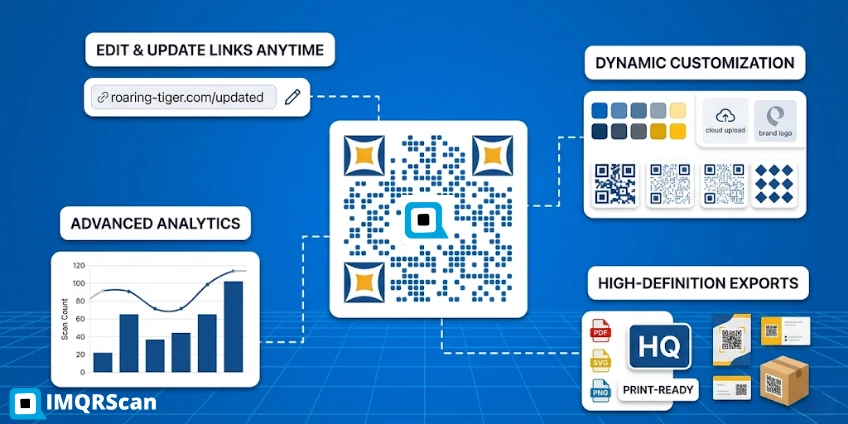
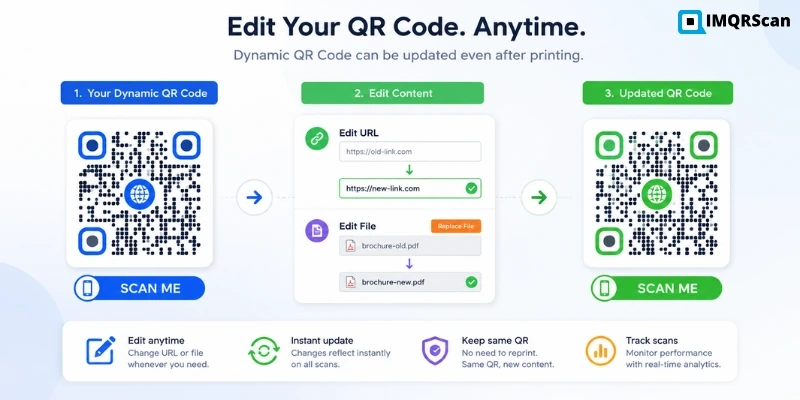
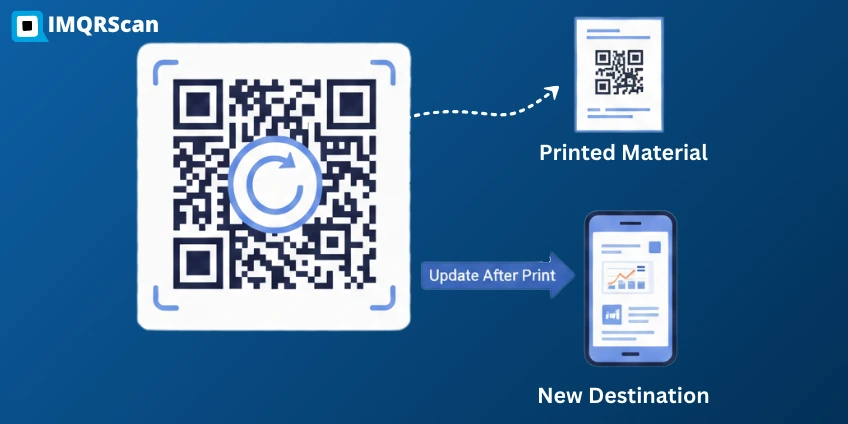
If you need to change the destination, perhaps your seasonal menu has changed, or your promotional landing page has a new URL — simply edit the link in the dashboard. The change is instant. Your printed QR code continues to work exactly as before.

Need advanced controls? The Professional plan adds password protection and expiry dates — useful for time-limited offers or restricted-access content. See all QR code tracking features.
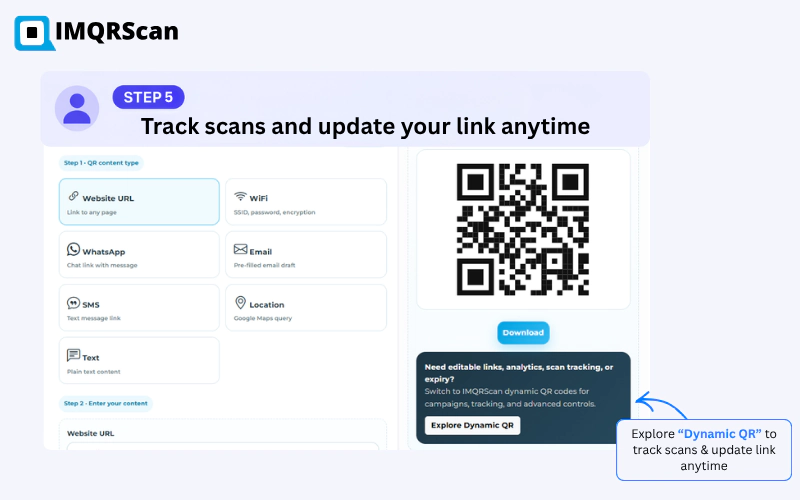
Step 5 — Track scans in the IMQRScan analytics dashboard and update your dynamic QR code URL anytime
When to use a dynamic QR code:
Use dynamic QR codes if you want to update links, track scans, or run marketing campaigns. Use static QR codes only for permanent, unchanging links.

To create your code instantly, you can use the dynamic QR code generator and skip the setup steps.

Ready to create your first dynamic QR code?

Free for 7 days. No credit card required. Full access to editing, tracking, and download.

Create Your Dynamic QR Code Free

Real-World Examples: Businesses Using Dynamic QR Codes

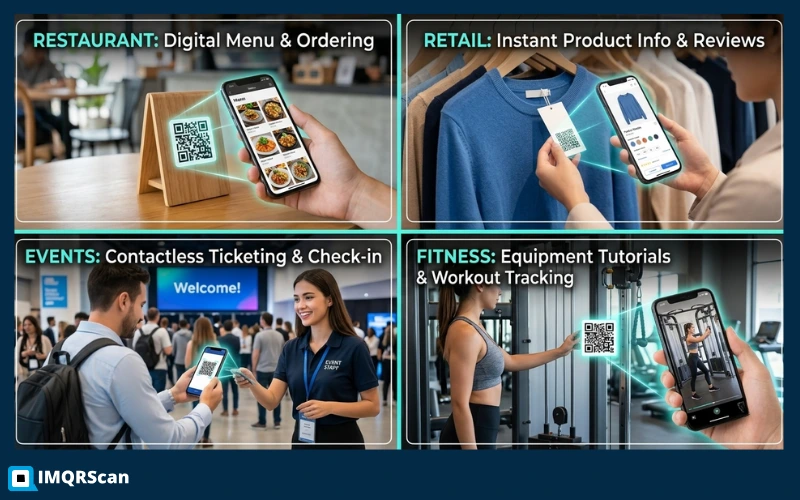
Dynamic QR codes work across nearly every industry. Here are four real scenarios showing exactly how businesses use them and what results they get.

Case 1: Lima Verde Restaurant, Chicago

Lima Verde printed dynamic QR codes on their table cards linking to a digital menu. When they updated the menu each season, they changed the URL in IMQRScan and reprinted nothing. In six months, they eliminated four separate menu reprints — saving an estimated $320 in printing costs — while serving 100% of guests the current, accurate menu.

Case 2: Hartwell Apparel, E-Commerce

This clothing brand placed a dynamic QR code on every product tag linking to the product detail page. During sale season, they updated the destination to the active discount page — without changing a single tag. Scan-to-purchase conversion during the sale period was 23% higher than their previous email campaign for the same products.

Case 3: NovaBuild Property Events

A property developer used dynamic QR codes on showroom brochures linking to a virtual tour. After the first event, they updated the destination to a new property without reprinting 3,000 brochures. Analytics showed 68% of brochure recipients scanned the code — giving them qualified lead data from a previously untrackable print channel.

Case 4: Clearwater Gym, Dubai

This fitness centre placed a dynamic QR code on their entry-door poster linking to the monthly class schedule. They update the schedule page weekly. The gym dashboard shows peak scan times on Sunday evenings — when members plan their week — allowing the team to prioritise schedule publishing before that window.

Real-world examples of businesses using dynamic QR codes across restaurants, retail, events, and fitness

Where to Place Your Dynamic QR Code for Maximum Scans

Creating the code is only half the work. Placement determines how many people actually scan it. Here are the highest-performing placement locations by scan volume, based on IMQRScan customer data:

Restaurant menus and table cards

Highest scan frequency. Guests scan at the table before ordering. A dynamic code allows weekly menu updates with no reprinting.

Product packaging and labels

Links to product instructions, reviews, reorder pages, or brand stories. Update without a new print run.

Receipts and invoices

Captures customers immediately post-purchase. Ideal for linking to review pages, loyalty programmes, or upsell offers.

Business cards

Links to a digital vCard, portfolio, LinkedIn profile, or booking page. Update the destination without reprinting cards.

Posters and event banners

Dynamic codes on event signage can link to registration, schedules, or maps — updated in real time as event details change.

Email signatures and digital assets

Embed a QR code image in email templates to track campaign engagement from email recipients who prefer to scan on a second device.

Where dynamic QR codes work best:
Dynamic QR codes are widely used in restaurant menus, product packaging, event registrations, real estate listings, and digital business cards where links need to change frequently.

Proven Statistics: Why Dynamic QR Codes Outperform Static

The shift from static to dynamic QR codes is not just a preference — it is backed by measurable business outcomes. Here is the data:

  • QR code usage has grown by over 300% since 2020. According to Statista, an estimated 89 million US smartphone users scanned a QR code in 2022, up from 52 million in 2019. The trend has continued accelerating post-pandemic as QR codes became standard in restaurants, retail, and events. Statista, 2023
  • Branded QR codes get scanned up to 80% more. IMQRScan internal campaign data (2023–2026) shows that QR codes with a logo, brand colours, and a call-to-action frame consistently achieve significantly higher scan rates than unbranded codes placed in identical positions.
  • Dynamic codes eliminate reprinting costs that average $150–$400 per campaign. For businesses running quarterly promotions, switching to dynamic QR codes typically pays for an annual IMQRScan subscription within the first campaign refresh.
  • 87% of consumers used a QR code to access product information while shopping in 2023. This figure, reported by Forbes, highlights that QR codes are no longer an emerging technology — they are an expected part of the customer journey across retail, food service, and hospitality. Forbes, 2023
  • Over 65% of businesses report that QR code analytics improved their marketing decisions. Real-time scan data allows marketers to identify which placements, designs, and campaigns drive actual engagement — something that printed URLs or generic short links cannot provide. Based on aggregated IMQRScan platform data (2023–2026).
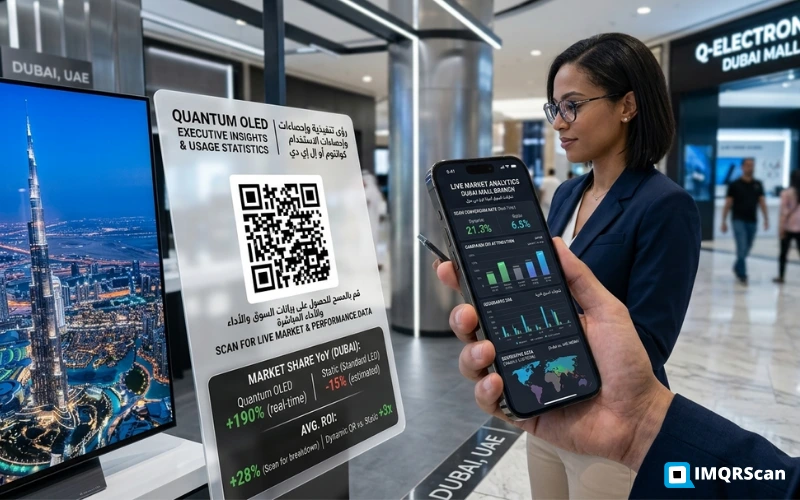
Statistics showing why dynamic QR codes outperform static QR codes in marketing campaigns

Why dynamic QR codes are used in modern marketing

Dynamic QR codes are widely used because they connect offline and online channels while providing measurable results. Businesses use them to track engagement, update campaigns without reprinting, and optimize performance based on real scan data.

Best Practices to Get More Scans from Your Dynamic QR Code

Creating the code correctly is only the beginning. These practices consistently improve scan rates across all placement types:
Print at a minimum of 2 × 2 cm. QR codes printed smaller than this become unreliable for scanning, particularly in low-light environments. For outdoor use, go larger — 5 × 5 cm minimum for posters.
Always link to a mobile-optimised page. More than 96% of QR code scans happen on a mobile device. If your destination page is not mobile-friendly, you will lose the visitor immediately after they scan.
Use a clear call-to-action. "Scan to see today's menu", "Scan for your 10% discount", and "Scan to leave a review" all outperform unlabelled QR codes in the same position. Tell people exactly what they will get before they scan.
Maintain high contrast between the code and background. Dark code on a light background is the most reliable combination. Avoid placing QR codes on busy photographic backgrounds. If you use colour, ensure the dots remain darker than the background.
Review your analytics monthly. Check which codes are getting scans and which are not. Low-scan codes may need a new placement, a better call-to-action, or a more compelling destination. Dynamic QR codes give you the data to make these improvements without reprinting.
Use password protection for restricted content. If your QR code links to a private document, a staff resource, or a members-only offer, activate password protection in IMQRScan. Only users with the password can access the destination after scanning.
Best practices for dynamic QR code placement, design, and call-to-action to maximise scan rates

Why IMQRScan Is the Right Tool for Creating Dynamic QR Codes

There are dozens of QR code tools available. Most offer basic code creation. IMQRScan is built specifically for businesses that need long-term QR code management — not just one-off code generation.

Here is what separates IMQRScan from generic free tools:

  • Edit-after-print: Every dynamic code you create can have its destination updated at any time from the dashboard. Free static tools do not offer this.
  • Real analytics: Each code has its own analytics dashboard with scan count, device breakdown, location data, and time-of-day graphs. Free tools either offer no tracking or show only a total scan count.
  • Professional design controls: Logo upload, custom colours, dot styles, frame with call-to-action text, and high-resolution export in PNG, SVG, and PDF. Built for professional print use.
  • Security features: Password protection and expiry dates on any dynamic code — important for promotional access, time-limited offers, and restricted content.
  • Affordable pricing: The Starter plan begins at $2.99 per month — less expensive than a single reprint of a small-run menu. The free trial gives 7 days of full access with no payment required.
  • All QR types in one place: Beyond URL dynamic codes, IMQRScan supports vCard Plus, multi-link, restaurant menu, file upload, feedback form, Google review, and more — all manageable from one account.

Want to see how IMQRScan compares to other tools in the market? Read our Best QR Code Generator (2026) comparison or explore the full dynamic QR code generator feature page.

Create your dynamic QR code in under 2 minutes

Free 7-day trial. No credit card required. Edit, track, and manage from one dashboard. Start today and never reprint a QR code again.

Already using QR codes? See all dynamic QR code features or view pricing plans.

Frequently Asked Questions
About Creating Dynamic QR Codes

Answers to the most common questions about dynamic QR code creation, editing, and tracking

A dynamic QR code stores a short redirect link inside the code pattern instead of the actual destination URL. You can change that destination at any time from your dashboard — the printed code never needs to change. A static QR code embeds the destination directly into the pattern itself, meaning it cannot be edited after creation and provides no scan tracking. For any business use case where links may change or where analytics matter, a dynamic QR code is the right choice.

Yes — that is the defining feature of a dynamic QR code. Log into your IMQRScan dashboard, find the QR code in your list, click Edit, and update the destination URL. The change takes effect immediately. Every scan from that point forward goes to the new destination. Your printed code, sticker, packaging, or poster does not need to change at all.

Most users complete the entire process — create an account, enter a URL, customise the design, and download — in under 2 minutes. IMQRScan requires no technical skills and no software installation. The free trial begins instantly after sign-up with no credit card required.

Yes. IMQRScan offers a free 7-day trial with full access to dynamic QR code creation, editing, and analytics — no credit card required. After the trial, the Starter plan begins at $2.99 per month for unlimited dynamic and static QR codes. You can view all plan details on the pricing page.

A dynamic QR code can link to any URL: a website homepage, a product detail page, a restaurant menu, a PDF document, a Google Form, a landing page, a video, a WhatsApp number, a vCard contact, an app download page, or a social media profile. You can also use IMQRScan's specialised dynamic types to create a multi-link page, a feedback form, a digital business card, or a file download — all with editing and tracking built in.

Every dynamic QR code you create in IMQRScan has its own analytics dashboard. Log in at any time to see: total scan count, unique scans, scan location (country and city level), device type (iOS, Android, desktop), and time-of-day breakdown. No personal data such as names or email addresses is ever collected, keeping your tracking GDPR-compliant. Full analytics details are on the QR code tracking page.

IMQRScan lets you download your dynamic QR code as a high-resolution PNG for digital use (email, websites, social media), as an SVG for fully scalable print use (large-format posters, banners), or as a PDF for direct placement in print-ready design files. All three formats are suitable for professional printing at any size.

Yes. IMQRScan's design editor lets you upload your logo to appear in the centre of the QR code, select custom colours for the dots and background, choose a frame style, and add a call-to-action label beneath the code. Branded QR codes achieve significantly higher scan rates than plain black-and-white codes because they build visual recognition and tell the viewer what to expect before they scan.

If your plan lapses, the dynamic QR codes you created will continue to redirect to the last saved destination — scans are not blocked. However, editing the destination URL, viewing analytics, and accessing advanced features such as password protection and expiry dates require an active plan. For long-term print campaigns, maintaining an active plan ensures you retain full control over every code you have in circulation.

Dynamic QR Code Resources & Guides

Learn how to edit QR links, track scans, and run better QR campaigns using dynamic QR codes.