App Download QR Code: What It Is and How to Use It
App install rates drop sharply the moment you ask someone to type a URL. Most people won’t search the App Store by app name, find the right listing, and tap install, not from a poster, not from a product box, not from a print ad. A QR code removes all of that. One scan takes them directly to the download page.
Quick Answer:
An app download QR code is a scannable image that contains a link to a mobile app’s listing on the App Store, Google Play, or a custom landing page. When a user scans it, their phone opens the download page for that app. The code itself doesn’t contain the app, it’s a shortcut to the store listing.
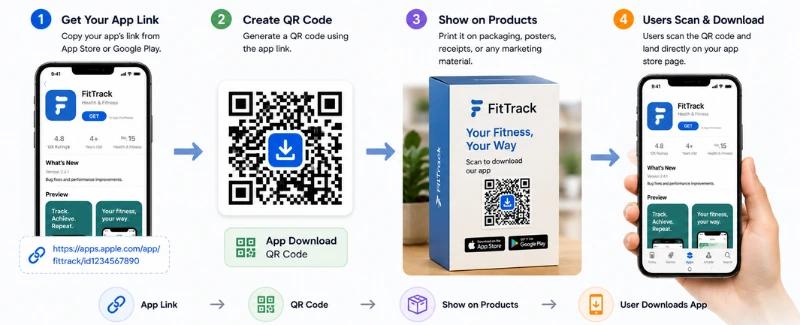
Table of Contents
Create App Download QR Code
Paste your app store URL, add branding, and download your QR code in PNG, SVG, or PDF.
Open GeneratorThis guide explains what an app download QR code actually is, how it handles the iOS and Android problem, what kinds of businesses use them and where, and the practical differences between the options available to you.
What Is an App Download QR Code?
The App Download QR code stores a URL, one URL, which is an important limitation to understand before you start printing anything. If that URL is an App Store link, it works perfectly for iPhone users and lands Android users in a browser with no useful result. The reverse is true for Google Play links.
There are workarounds for this, smart landing pages and dynamic QR codes with platform routing, both covered below. But the fundamental thing to understand is that a QR code is a container for a link, and the link determines the experience.
What makes them practically useful is the friction reduction. An app that grows through QR codes placed at high-intent physical touchpoints, product packaging, in-store displays, event materials, doesn’t rely on users discovering it through search. They encounter it at the moment they’re already holding the product or walking through the store.
How an App Download QR Code Works
An app download QR code works by storing a URL inside the QR pattern. When someone scans it with a phone camera, the phone reads the link and opens the app’s download page. If the QR code contains an App Store link, iPhone users go to the App Store. If it contains a Google Play link, Android users go to Google Play. The app is still installed through the official store, just like any normal app download.
- For a single-platform app, this is simple: one QR code points to one store. This works well if your app is only for iPhone or only for Android.
- For apps available on both platforms, businesses usually use one of two options. The first is a smart landing page with both App Store and Google Play buttons. The second is a dynamic QR code with platform routing, which sends iPhone users to the App Store and Android users to Google Play automatically.
- For most businesses, a smart landing page is the simplest option because it works with any QR code and gives you space to show app screenshots, benefits, ratings, or instructions. Dynamic platform routing gives a smoother experience, but it is better for campaigns where automatic redirection and tracking matter.
Why Businesses Use App Download QR Codes
The honest commercial case is straightforward: app stores are not great discovery engines. Most installs come from search within the store, word of mouth, or paid acquisition. Physical touchpoints, packaging, receipts, storefronts, are underused channels that already have a warm, engaged audience.
A customer unpacking a product they just bought is in a high-engagement moment. They’re already thinking about the brand. A QR code on the box that takes them to the companion app converts at a meaningfully higher rate than a cold install from a paid search ad, partly because of context and partly because the friction is so low.
There’s also a competitive dimension. For many product categories, the app is where the ongoing relationship with the customer happens, loyalty points, reorders, customer support, personalisation. Getting someone to install the app at the point of first purchase is significantly easier than trying to re-engage them later.
Controlled distribution
A QR code on your own materials reaches your actual customers, not a general audience. The install intent is higher.
Measurable
A dynamic QR code gives you scan data, how many people scanned, from which location, on which device, at what time.
One-time setup
Once the code is printed on a product template or a receipt footer, it requires no ongoing effort.
Works offline
Print, packaging, and physical events are channels where a clickable button is impossible.
App Download QR Code Examples by Industry
Six industries where app download QR codes show up consistently, with specific examples of how they’re typically deployed.
Retail and E-Commerce Apps
Clothing brands, electronics retailers, and direct-to-consumer brands use QR codes on carrier bags, inside product boxes, and at checkout counters. The timing is deliberate, a customer who just made a purchase is already bought in. Getting them to install the loyalty app or the repurchase app at that moment is far easier than reaching them cold.
Restaurant and Food Delivery Apps
QR codes have become standard on food packaging, table cards, and delivery bags since contactless ordering became common. For restaurants with their own app, the delivery bag insert is a particularly effective placement, the customer just received food, the experience is fresh, and installing the app saves steps on the next order.
Fitness and Wellness Apps
Gyms, supplement brands, and fitness equipment manufacturers use QR codes to link customers from the physical product to the digital companion. Equipment like treadmills and exercise bikes often ship with a QR code in the setup guide linking to the companion app. The user needs the app to track workouts, the download is effectively mandatory, which makes the QR code the obvious delivery mechanism.
Banking and Finance Apps
Banks and fintech companies use QR codes at branch desks, on printed marketing materials, and on ATMs to drive app adoption. The context is high trust, the customer is already interacting with the institution, which makes them more likely to install the app than they would be from a general marketing touchpoint. QR codes at bank counters during account opening have particularly high conversion rates.
Gaming and Entertainment Apps
Game publishers use QR codes in physical merchandise, gaming magazines, and event booths to direct people to game downloads. Collectible card games, board game companion apps, and streaming services all use this approach. Physical events like gaming conventions are particularly high-conversion environments, attendees are already in the right mindset.
Events and Ticketing Apps
Event organisers and ticketing platforms use QR codes on physical invitations, venue posters, and event programmes to drive app installs before or during events. Getting attendees to install the app before the event means they’re more likely to use event features: digital tickets, schedules, networking tools, on the day.
Where to Place an App Download QR Code
Placement drives conversion more than almost any other factor. The same code in a high-intent location outperforms the same code in a low-intent one by a significant margin. These are the placements that consistently work.
- Product Packaging: The highest-value placement for most product businesses. The customer is holding the product, already engaged, already positive about the brand. The box, the insert card, and the inside of the lid are all prime real estate. The key is timing the ask right, an app download prompt makes most sense when the customer has something to gain from installing immediately: activating a warranty, claiming loyalty points, completing a setup process.
- Posters and Flyers: Out-of-home advertising with QR codes works best at places where people pause, waiting areas, bus shelters, queue areas in shops. A commuter waiting for a bus has thirty seconds and a phone in their hand. The same person walking past your poster at full speed has neither. Size the code at minimum 4 cm for posters and make sure the surrounding context tells the viewer what they’re scanning into.
- Receipts and POS Displays: Receipt footers are underused. For businesses with a physical retail presence, every receipt is a post-purchase touchpoint. A QR code there adds exactly zero cost per transaction once the template is updated, and it reaches every customer who bought something. POS terminal displays catch customers during the payment moment, slightly less focused attention but still a warm audience.
- Email Signatures: A QR code in an email signature targets a specific audience: people you correspond with regularly, who are already in a relationship with the business. For B2B apps and professional tools, this can be an efficient low-friction path to installs from existing contacts who haven’t downloaded the app yet. PNG format for the QR code in email.
- Trade Shows and Events: Event environments are high-engagement but fleeting. Someone interested in your product at a trade show booth might not be ready to install right then, but they’ll take a card. A business card or a handout with a QR code gives them a path to install later when they have more time, and keeps the option available past the end of the event.
App Download QR Code vs App Store Badge
App Store and Google Play badges, the standardised download buttons you see on websites and printed materials, serve the same purpose as a QR code in some contexts and a completely different purpose in others.
| Feature | App Store / Play Store Badge | App Download QR Code |
|---|---|---|
| Works in print | Poorly, requires typing a URL or scanning a badge link | Yes, one scan |
| Works on screen | Yes, tap to open store | Yes, scannable from screen |
| Platform-specific | Yes, separate badge per store | Can cover both with smart routing |
| Branded design | Fixed badge design | Fully customisable |
| Scan tracking | No | Yes, dynamic code |
| User effort | Medium, tap and navigate | Low, one scan from camera |
| Best for | Websites, app landing pages | Print, packaging, physical materials |
The practical answer: on a website or a digital ad, use the App Store and Google Play badges because they’re clickable. On anything physical, packaging, posters, business cards, receipts, a QR code is the right tool because badges can’t be scanned and URLs won’t be typed.
Best Practices for App Download QR Code Campaigns
Use a smart landing page or platform routing
Don’t assume your audience is all on one OS. A QR code that only works for half your users is a waste of half your placement budget.
Give people a reason to scan
A discount on first in-app purchase, access to exclusive content, or completion of a setup process are all reasons that create urgency at the point of scanning. A code that just says ‘download our app’ with no immediate benefit has lower conversion than one tied to something specific.
Label the code clearly
Five to eight words of context telling people what the code does and what they get. ‘Download the app, get 10% off’ converts better than ‘Scan to download’.
Size for the placement
2.5 cm minimum for anything at arm’s length. Larger for anything further. SVG format for print, it scales to any size without quality loss. Learn more about size guide at Minimum QR Code Size.
Use dynamic codes for large print runs
If the app store URL or landing page URL ever changes, a dynamic code is an update in a dashboard rather than a reprint.
Track and iterate
Scan data from a dynamic code tells you which placements are generating actual engagement. If the receipt footer is generating five times the scans of the poster, that’s useful information for the next campaign.
Create Your App Download QR Code
Ready to put a QR code on your packaging, your flyer, or your receipt footer? Paste your app store URL into IMQRScan’s app download QR code generator, add your branding, and download in PNG, SVG, or PDF.
App Download QR Code GeneratorFAQs About App Download QR Codes
Practical answers about app download QR codes, iPhone and Android support, tracking, and free creation.
Ready to create a QR code for your mobile app?
Open App Download QR Code GeneratorRelated App Download QR Code Guides
Continue with app QR creation, business use cases, troubleshooting, dynamic routing, and scanning guides.
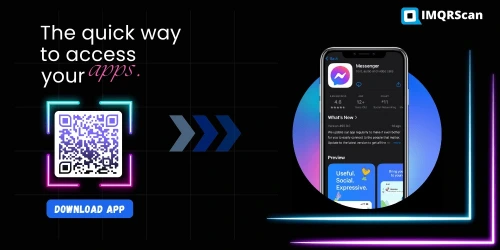
App Download QR Code Generator
Create a QR code for your App Store, Google Play, or smart app landing page.
Open Tool
App Download QR Code Uses
Learn what app download QR codes are and how businesses use them on packaging, posters, receipts, and ads.
Read Guide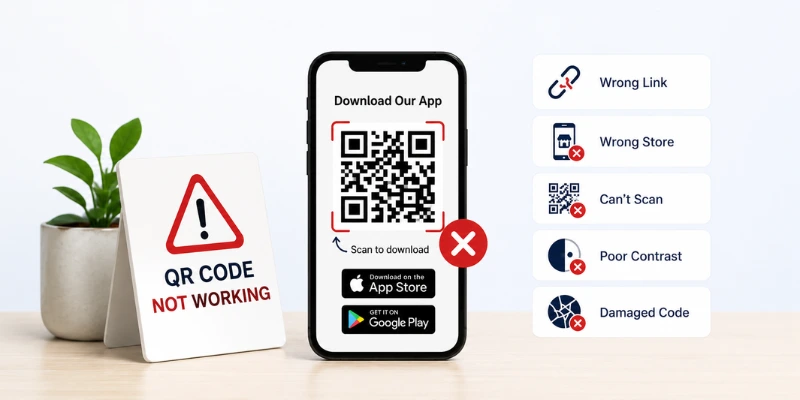
App QR Code Not Working
Fix app QR code issues like wrong store links, blurry print, poor contrast, broken URLs, and scan failures.
Read Guide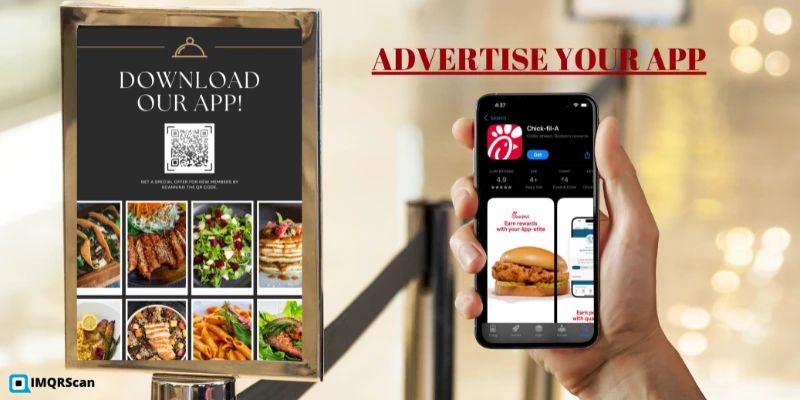
Download App Using QR Code
Learn how to scan an app QR code on iPhone or Android and safely install the app from the official store.
Read Guide