Branded Link vs QR Code: Which Is Better?
Last updated: November 2026 · Written & Reviewed by the IMQRScan Editorial Team
A branded link is a short web address with your own domain, and a QR code is a scannable image of a link. Links work best on screens, QR codes work best in print, and many campaigns use both.
Quick Answer
Use a branded link where people can click, such as emails and social posts. Use a QR code on paper, packaging and signs. In print, add the short branded link under the QR code as a backup.
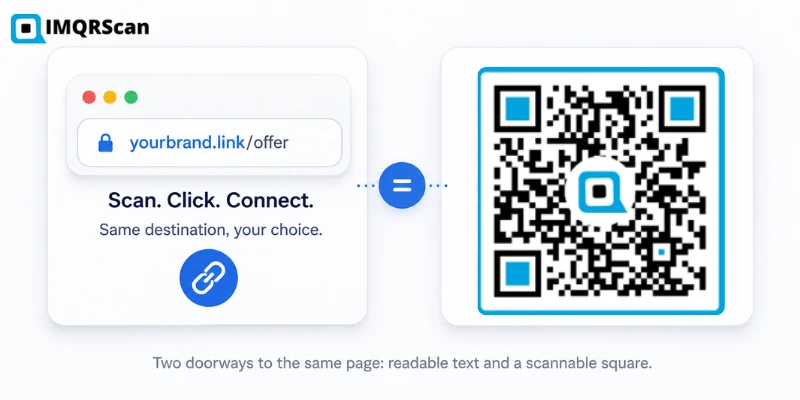
Table of Contents
Create Your Own QR Codes
Create QR codes for email, websites, business cards, WiFi, PDFs, and forms with IMQRScan.
Start FreeCreate a URL QR Code
Turn any page link into a print-ready QR code with your logo and colors.
Open GeneratorUseful next reads
Branded link vs QR code, which is better? The honest answer is that they solve different problems. A branded link wins when people read or type. A QR code wins when people scan. Most businesses that treat this as an either-or choice end up leaving one channel weaker than it needs to be.
Key Takeaways
- Branded links are best for text channels where people read, remember, or type the address.
- QR codes are best for physical surfaces where typing any address is friction.
- Both can track clicks and scans. Dynamic QR codes and branded links use the same redirect idea.
- Neither is more secure by default. Trust comes from the domain behind the link or code.
- The strongest setups combine them: one destination, one analytics view, two doorways.
This guide compares both tools across tracking, branding, security, print, packaging, and every major use case. By the end, you will know exactly which one fits your situation, and when the smart move is to run both from the same destination.
We build QR tools at IMQRScan, so we know this space from the inside. We have kept this comparison neutral: branded links genuinely beat QR codes in several situations, and we say so plainly.
What Is a Branded Link?
A branded link is a short link built on a domain you own. Instead of a random shortener address, the link carries your name. Compare these two:
- Generic short link: bit.ly/3xK9pQz
- Branded link: go.acme.com/spring-sale
Both redirect to the same long page URL. The branded version does three extra jobs. It shows who is behind the link, it hints at what the page contains, and it builds recognition every time someone sees it.
Branded links live inside URL management tools. These platforms let teams create links, edit destinations, track clicks, and organize campaigns. Many modern URL management tools now ship with QR code generation built in, because the two features share the same redirect engine underneath.
What Is a QR Code?
A QR code is a two-dimensional barcode invented in 1994 by Denso Wave to track parts in car factories. Today it is the standard bridge from physical objects to web pages. A phone camera reads the pattern and offers the link in about a second.
QR codes come in two types, and the difference matters for this comparison:
- A static QR code stores the destination URL directly in the pattern. It never expires but can never be changed.
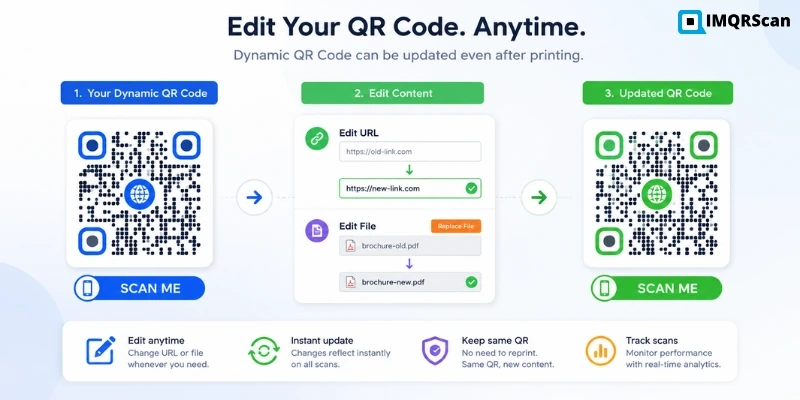
- A dynamic QR code stores a short redirect link. The owner can change the destination anytime and see scan analytics.
If you want the technical details of how the squares turn into a link, our explainer on how a QR code works covers it step by step. The format is also well documented on the Wikipedia QR code page.
How They Work
Under the hood, a branded link and a dynamic QR code are close cousins. Both rely on a redirect server.
- You create a short link that points to your real destination page.
- Someone clicks the link or scans the code.
- The redirect server logs the visit: time, device, and location by region.
- The server forwards the visitor to the destination page.
The only difference is the doorway. A branded link is typed, tapped, or clicked as text. A QR code is scanned as an image. A dynamic QR code is, in a real sense, a short link wearing a scannable costume. This is why QR code tracking and link analytics dashboards look so similar.
If you want to understand the reverse process, our guide on how to make a QR code into a link explains how to extract and use the URL stored inside a QR code.
Branded Link vs QR Code: Full Comparison Table
| Feature | Branded Link | QR Code |
|---|---|---|
| Offline use | Weak. Must be typed by hand | Strong. Built for print and surfaces |
| Online use | Strong. Clickable in any text channel | Weak on screens people already control |
| Analytics | Clicks, referrers, devices, geography | Scans, devices, geography, time of day |
| Tracking after launch | Yes, destination editable | Yes with dynamic codes, no with static |
| Branding | Your domain in every share | Logo, brand colors, custom frame |
| Security perception | Domain visible before click | Destination hidden until scanned |
| Product packaging | Only as supporting text | Primary tool, GS1-aligned future |
| Menus | Backup for broken scans | Primary tool |
| Marketing campaigns | Digital and spoken channels | Print, outdoor, and event channels |
| Print materials | Needs short, memorable wording | One scan, no typing |
| Business cards | Good as readable text | Better for instant action |
| Retail | Receipts and SMS follow-ups | Shelf tags, displays, packaging |
| Events | Pre-event emails and reminders | Badges, banners, signage on site |
| Restaurants | Delivery and social bios | Tables, windows, takeout bags |
| Healthcare | Patient emails and SMS | Posters, forms, appointment cards |
| Education | Learning platforms and email | Handouts, classroom displays |
When to Choose Branded Links
Pick a branded link as your primary tool in these situations:
- Spoken channels. Podcasts, radio, video, and webinars. Nobody can scan audio. A short, speakable link like go.brand.com/show is the only option that survives being read aloud.
- Social media and email. The audience is already on a screen. Asking them to scan a code on the same screen adds a pointless step. A clickable branded link converts directly.
- Trust-sensitive clicks. A branded link shows your domain before the click. That transparency raises click-through in channels where people hesitate on unknown short links.
- Word of mouth. A memorable branded link can be repeated between people. A QR code cannot.
- SMS campaigns. Texts are read on the phone itself, so a tappable link is the natural fit.
When QR Codes Are Better
Pick a QR code as your primary tool in these situations:
- Product packaging. Nobody types a URL off a shampoo bottle. A scan takes one second. Teams using a URL shortener for product packaging QR codes get the best of both: the code carries a short branded redirect inside it.
- Menus and table service. The QR menu is now standard behavior. Guests expect it.
- Posters, flyers, and outdoor media. Print-to-phone is exactly the job QR codes were adapted for. Pair the code with a clear call to action.
- Business cards and brochures. One scan saves a contact or opens a portfolio. Our URL QR code generator turns any page link into a print-ready code with your logo and colors.
- Events. Registration desks, badges, and banners all benefit from scan-to-open. No spelling, no typos, no friction.
- Anything that needs offline-to-online measurement. A dynamic QR code tells you which poster, which store, or which package drove the visit. Our guide on how to track QR code scans shows how to set this up per placement.
When You Should Use Both
Both options are underused. Here is the pattern that works:
- Create one destination page for the campaign.
- Create a branded short link pointing to it, for digital and spoken channels.
- Create a dynamic QR code pointing to the same page, for print and physical placements.
- Print the branded link in small text under the QR code as a fallback for people who cannot or do not want to scan.
- Compare click data and scan data to see which channels pull their weight.
The fallback line matters more than it looks. A small share of any print audience will not scan: damaged codes, older devices, low light, or simple preference. The short branded link under the code catches them. It also makes the material accessible to screen readers when reproduced digitally.
Case Studies
Example 1: A café menu
A café places a QR code on every table that opens the menu. The same menu link appears as cafe.example/menu on the window sticker and in the Instagram bio. Tables scan. Instagram taps. Both routes land on one page, and the owner sees exactly how many guests use each.
Example 2: A product launch
A skincare brand prints a QR code on the box that opens usage instructions and a reorder page. The launch email uses the branded link instead, since email readers click rather than scan. After launch, the brand updates the destination behind both to point at a new bundle page. Nothing is reprinted, and no email is present.
Example 3: A conference
Organizers email a branded registration link for weeks before the event. On site, banners and badges carry QR codes to the schedule. Same platform, same analytics, different doorway for each moment of the journey.
These examples describe common deployment patterns rather than named client results. The mechanics are identical at any scale.
Decision Matrix
| Your situation | Best choice |
|---|---|
| Audience sees the link on a screen they control | Branded link |
| Audience is near a printed surface | QR code |
| Link will be spoken aloud | Branded link |
| Destination may change after printing | Dynamic QR code |
| You need per-placement measurement offline | Dynamic QR code per placement |
| You need one asset across print and digital | Both, same destination |
| Maximum trust before the click | Branded link, domain visible |
| Fastest possible action from print | QR code with CTA text |
Pros and Cons
Branded links
Pros: readable, speakable, memorable, domain builds trust, clickable everywhere online.
Cons: useless on packaging without typing, needs a custom domain setup, misspellings lose visitors.
QR codes
Pros: zero typing, perfect for print, dynamic versions are editable and trackable, logo and colors carry the brand.
Cons: pointless on screens people already control, destination hidden until scanned, static codes are permanent.
Best Practices
- Keep branded links short and lowercase. Avoid numbers and hyphens that are hard to say aloud.
- Always add a call to action next to a QR code. Scan for the menu beats a bare square.
- Use a dynamic code for anything printed in volume, so a destination change never forces a reprint.
- Test QR codes at final print size on several phones before mass production.
- Name every link and code by placement in your dashboard, so analytics stay readable.
- Point both tools at fast, mobile-first landing pages. The doorway does not matter if the room is slow.
Expert Recommendations
Two more recommendations from our team:
- If you are choosing a platform, prioritize tools that handle links and codes in one dashboard. Our best QR code generator comparison covers what to look for and where the free tiers cut corners.
- Treat print QR placements like ad slots. Give each poster, shelf, or package its own dynamic code, and the scan data becomes a map of your best physical locations. More ideas in our QR code marketing guide.
Common Mistakes
- Putting a QR code in an email or social post. The reader is already on the device. Use the link.
- Printing a static code for a campaign whose destination will change. The reprint bill arrives later.
- Using a generic shortener domain in customer-facing print. It wastes a branding surface and looks less trustworthy.
- Skipping the fallback link under printed codes. Some readers will not scan, and you lose them silently.
- Sending both tools to different pages. Split destinations produce split analytics and inconsistent experiences.
- Printing codes too small or with low contrast. A code that fails to scan is worse than no code.
Future Trends
Three shifts are worth planning for:
- QR codes on every product. The GS1 Digital Link transition means product barcodes and marketing QR codes are converging into one scannable identity on packaging. Brands that already run dynamic QR programs will adapt fastest.
- Links and codes merging into one workflow. URL management tools with QR code generation are becoming the default, because teams want one destination, one edit, and one analytics view across both doorways.
- Trust checks becoming standard. Phones increasingly preview destinations before opening scanned links. Clean branded domains behind your codes will matter more, not less.
Conclusion
The branded link vs QR code question has a clean answer once you look at doorways. Text channels belong to the branded link. Physical surfaces belong to the QR code. Campaigns that live in both worlds should run both tools against one destination and one analytics view.
If the QR side of your stack is the gap, start with the IMQRScan URL QR code generator for print-ready branded codes, and use the dynamic QR code generator whenever the destination might change. Your printed materials will never go stale, and every scan becomes a data point.
Create a Branded URL QR Code
Turn any page link into a print-ready QR code with your logo, colors, and optional dynamic tracking.
Open URL QR Code GeneratorFrequently Asked Questions
Practical answers about branded links, QR codes, tracking, security, cost, print use, and SEO.
Ready to turn a branded link into a scannable QR code?
Open URL QR Code GeneratorRelated URL and QR Code Guides
Learn how to create, edit, decode, and extract links from QR codes.
How to Edit a QR Code
Learn which QR codes can be edited and how to change the destination of a dynamic QR code without reprinting it.
Read Guide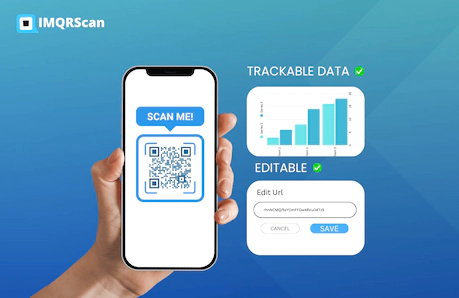
URL QR Code Generator
Turn any website link into a custom QR code with your logo, colors, frame, and downloadable print formats.
Open Tool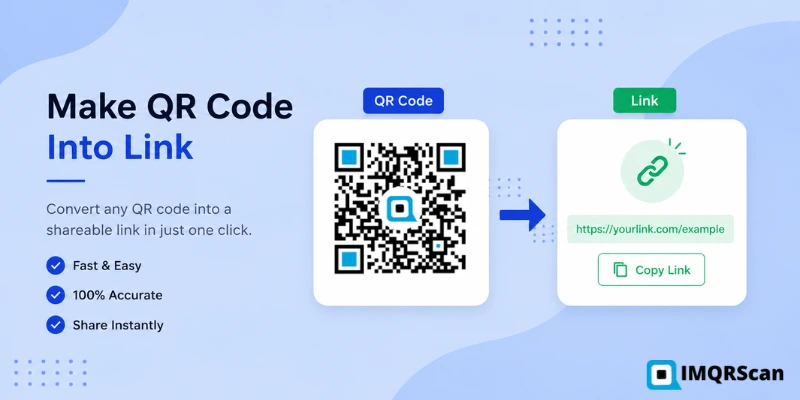
Make a QR Code Into a Link
Learn how to scan, decode, and extract the website URL stored inside an existing QR code.
Read Guide
QR Code Decoder
Decode a QR code image and reveal the URL, text, contact information, or other data stored inside it.
Read Guide